JobRouter has a web service interface which allows the communication with other applications. With the JobRouter web service, all operations regarding the JobRouter organizational structure can be carried out. This means that users, Job Functions, profiles, process owners, etc. can be read, created, changed or deleted.
In the web service configuration you can make the basic changes for the web service.
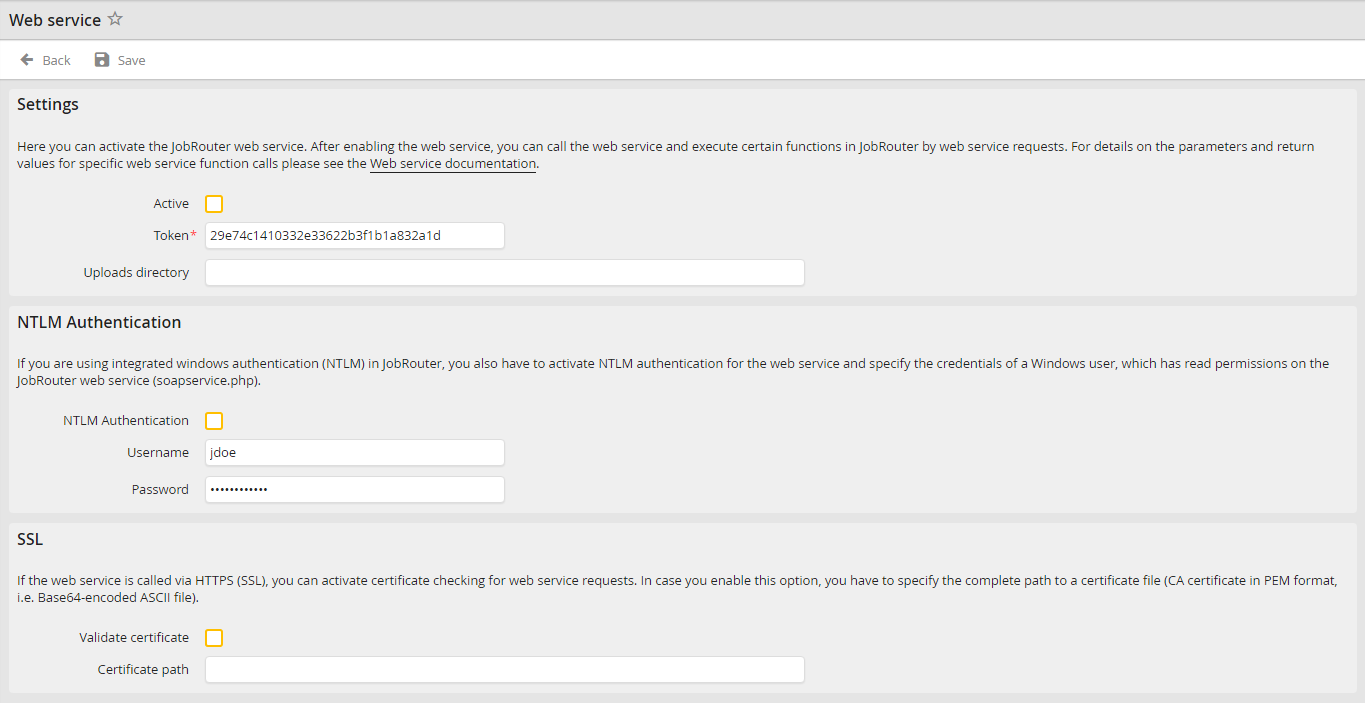
Web service settings
Web service settings |
Definition |
|---|---|
Settings |
|
Active |
Tick this checkbox to activate the web service. |
Token |
Enter a key here, which has to be provided by the web service client. Only the web service consumer should know this token. |
NTLM Authentication |
|
NTLM Authentication |
If you use the integrated Windows authentication (NTLM) in JobRouter, you also have to activate the NTLM authentication for the web service and enter a Windows user who has reading permissions for the JobRouter web service (soapservice.php). |
Username |
Username of the Windows user |
Password |
Password of the Windows user |
SSL |
|
Validate certificate |
Tick this checkbox if a certificate for using the web service should be used. |
Certificate path |
Enter the complete path for the certification file here (CA certificate in PEM format). |
