Here you can make the settings for the JobRouter Sign / JobLink for Namirial module.
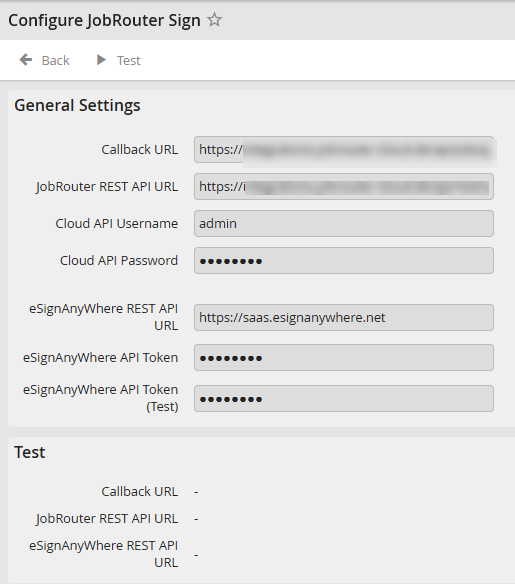
Configuration
The following settings are needed:
Setting |
Description |
|---|---|
Callback URL |
URL for the JobRouter installation, which serves as callback for eSignAnyWhere. eSignAnyWhere sends callbacks for finished signature processes and status modifications, which are relevant for the JobRouter process. The indicated URL must be accessable for the utilized eSignAnyWhere installation (Cloud or On-Premise) and point to https://[server]/jobrouter/api/jobsign/ (the final slash is mandatory). |
JobRouter REST API URL |
URL to the REST API of the JobRouter installation which manages the callbacks for eSignAnyWhere. The local JobRouter installation calls this URL regularly, e.g. to query whether a document has already been signed. The specified URL must be accessible from the local JobRouter and point to https://[server]/jobrouter/api/rest/v2/ (the final slash is mandatory). |
Cloud API user name |
User name of a valid JobRouter user in the JobRouter installation mentioned above |
Cloud API password |
Individual user password |
eSignAnyWhere REST API URL |
URL to the REST API of the eSignAnyWhere installation to which the documents are transferred. The specified URL must be accessible from the local JobRouter and point to https://saas.esignanywhere.net |
eSignAnyWhere API Token |
Token for the REST API connection (Production) |
eSignAnyWhere API Token (Test) |
Token for the REST API connection (Test) |
Testing the connections
To test the Rest, Cloud API and Enpoint connections that have been set up, click Test in the menu at the top. In the Test section below you can see the results. In case of success OK is returned, in case of error you can see the error message here.
Please note: If you have a JobRouter Sign license, JobRouter AG will provide the values via the license, so these values may not be changed. If you have licensed JobLink für Namirial, you have to make the settings yourself. In that case both URLs must point to your own JobRouter installation.
Since the signature process itself is not carried out in JobRouter, but in eSignAnyWhere, the information about pending and executed signatures must be exchanged between eSignAnyWhere and JobRouter. This is done using the Push method, i.e. eSignAnyWhere sends a callback call whenever the status of a signature changes. The endpoint for this callback must be accessible from the eSignAnyWhere instance. Since for JobRouter Sign eSignAnyWhere is operated in the cloud, the endpoint for the callback is also provided by JobRouter AG. This endpoint receives the callbacks and stores the information internally. Your local JobRouter installation queries the information, which means that the internal firewall only has to be configured for outgoing requests and not for incoming callbacks.
If JobLink for Namirial is licensed, your own JobRouter installation must be configured as an endpoint for the callback and the firewall must be configured for incoming requests of your own eSignAnyWhere instance (cloud or on-premise).
