For targeted problem analyses, access to messages with less importance might possibly be needed. Especially searches for the cause of performance problems or otherwise unexplainable behavior might make a temporary change of the log level configuration sensible and useful.
To define the minimum importance required for messages to be logged, the log level in the JobRouter service configuration has to be set to the respective value.
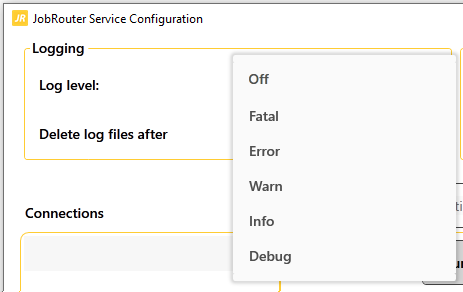
Possible values:
•Off: Logging deactivated
•Fatal: Critical error (Program termination)
•Error: Error (Exception caught, processing was handled differently)
•Warn: Unexpected situation occurred (default value)
•Info: General information (Program execution)
•Debug: Detailed information (Locating errors)
For example, if you define the value Info as log level, all messages with an importance of Fatal, Error, Warn and Info will be logged.
A log level change needs the respective service to be restarted to take effect.
Warning: Please note, reducing the minimum importance of messages you want to log can lead to a significant amount of data (under circumstances multiple hundreds of MB per hour) written into the log files over a short amount of time. Please ensure that enough free storage space is available for the output directory and after logging all necessary messages, set the log level back to the default value Warn.
