You can alter the following properties:
Setting |
Description |
|---|---|
Subtable |
If you select a fixed process subtable, you can only select this subtable for output parameter assignments. |
You can use the following input parameters:
Input Parameters |
Description |
|---|---|
Column delimiter |
Separators of the individual columns in the file |
Escape character |
Characters used to mark delimiters |
Text qualifier |
Character used to highlight the beginning and end of a field |
1st column contains column name |
Specify if the first row of the output file should contain the column name. |
Character set |
Character set of a CSV file |
Field links |
Specify which fields of the CSV file should be filled from which subtable fields. |
The output parameters are as follows:
Output Parameters |
Description |
|---|---|
Return code |
If an error occurs, the return code -1 will be written into the selected field. |
Error message |
Specify where any error messages arising during the execution of the function should be saved. |
CSV file |
Specify an attachment or text field, where the created file or its path shall be stored. |
Number of rows |
You can output the number of rows in a process table field. |
Example
Configuration:
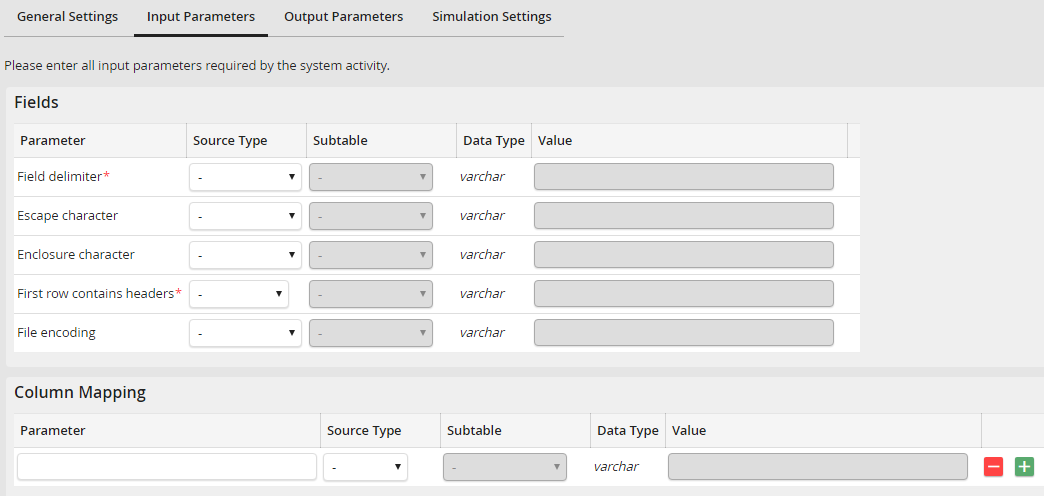
CSV System Activity: Input Parameters
The configuration Qualifier has the value ##.
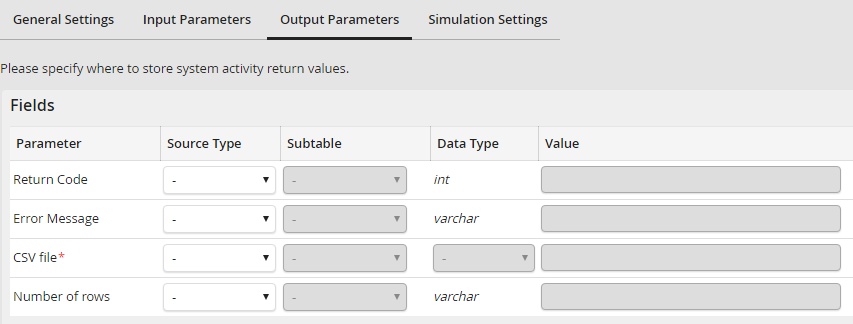
CSV System Activity: Output Parameter
Data:
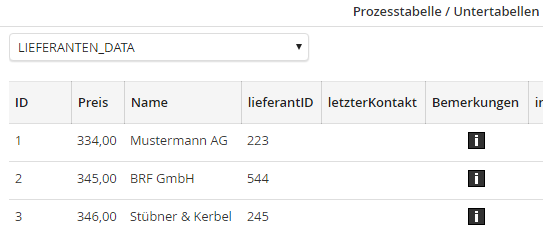
CSV System Activity: Export data
Content of a CSV file after exporting:
##ID##;##vendor##;##price##
##223##;##Mustermann AG##;##334##
##544##;##BRF GmbH##;##345##
##245##;##Stübner & Kerbel##;##346##
