With the function Edit data record it is possible to assign values from a JobData table to one or multiple data records. The data records do be processed can be determined based on configurable search criteria.
The following settings can be made:
Setting |
Description |
|---|---|
JobData table |
Select the JobData table. |
Fix subtable |
If you want to add several data records, you can select a process subtable here, which you can use for the assignment of input and output parameters. In this case, the data for the new data records will be taken from this table. |
Input parameters |
Description |
|---|---|
Maximum number of hits |
With this setting the number of data records to be processed can be limited. If e.g. 3 data records are found based on the search criteria, but the value is set on 2, only the first 2 data records will be changed. A respective note will be recorded in the JobData log file (output/log directory, warning level). |
Search filter |
Links table columns with process data to define search criteria for the entries, which have to be deleted. |
Assignments |
Here you can link the respective column of the JobData table with data from the process- or subtable. |
Output parameters |
Description |
|---|---|
Number of hits |
You can link the number of processed data records with a process table field. |
Record-ID |
The unequivocal identifier of the new data record (one or several). If multiple data records were processed, the IDs will be inserted in form of a comma-separated list in the linked fields. |
Return code |
In case of an error, the return code -1 will be displayed in the indicated field. |
Error message |
Determine, where the error messages, occurring during the execution of the function, should be stored. |
Example
JobData table COMPANY_VEHICLES:
JRID |
REG_NUMBER |
VTYPE |
ASSET_NO |
MAINTENANCE |
|---|---|---|---|---|
12345 |
MA-JR 2018 |
XC60 T6 |
C73-00-83 |
0 |
12346 |
MA-JR 2017 |
V60 D4 |
A13-12-51 |
0 |
12347 |
MA-JR 1111 |
XC60 D5 |
C-27-59-77 |
0 |
12348 |
MA-JR 2233 |
XC60 T6 |
C73-23-34 |
0 |
12349 |
MA-JR 2211 |
XC60 D5 |
C73-25-56 |
0 |
Configuration:
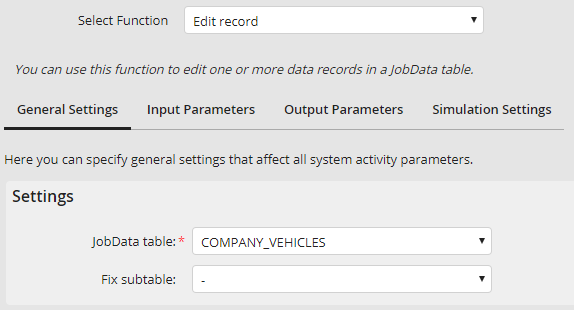
General settings
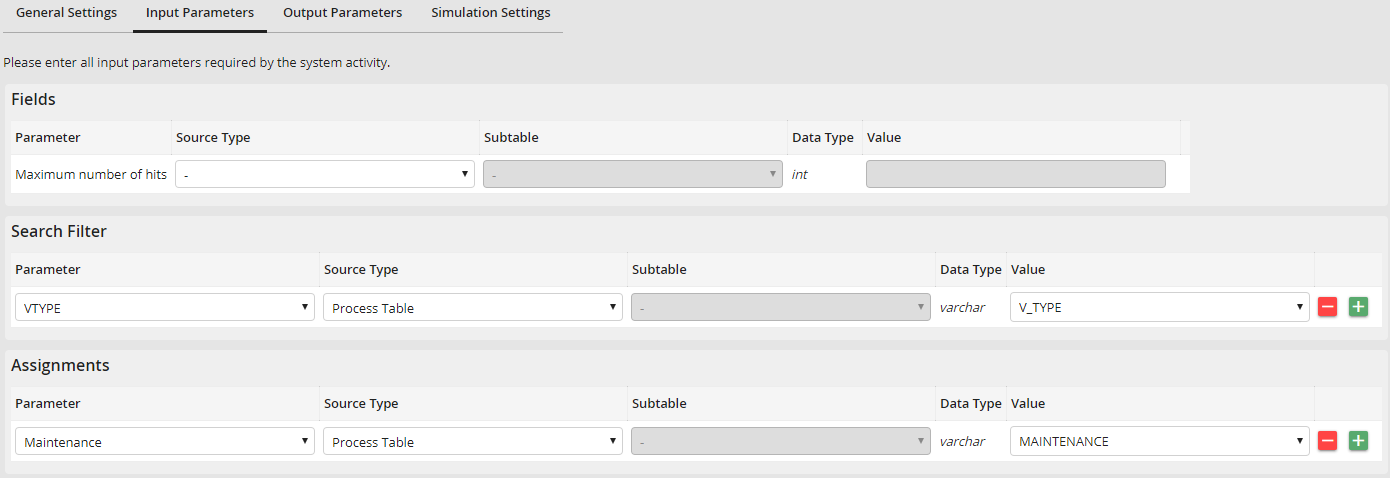
Input parameters
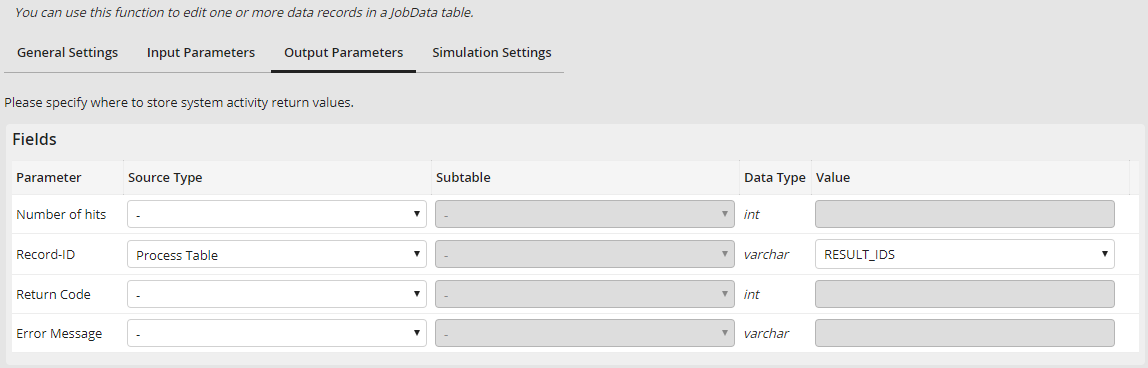
Output parameters
Execution with vehicle type "XC60 T6" and value 1 for maintenance flag. Content of JobData table COMPANY_VEHICLES:
JRID |
REG_NUMBER |
VTYPE |
ASSET_NO |
MAINTENANCE |
|---|---|---|---|---|
12345 |
MA-JR 2018 |
XC60 T6 |
C73-00-83 |
1 |
12346 |
MA-JR 2017 |
V60 D4 |
A13-12-51 |
0 |
12347 |
MA-JR 1111 |
XC60 D5 |
C-27-59-77 |
0 |
12348 |
MA-JR 2233 |
XC60 T6 |
C73-23-34 |
1 |
12349 |
MA-JR 2211 |
XC60 D5 |
C73-25-56 |
0 |
Content of process table:
RESULT_IDS |
|---|
12345,12348 |
