This integration displays a document in a user's form using the DocuWare WebClient. The document is referenced using the DocuWare Doc ID (DWDocID).
Configuration of the DocuWare connections version ≥ 6.5
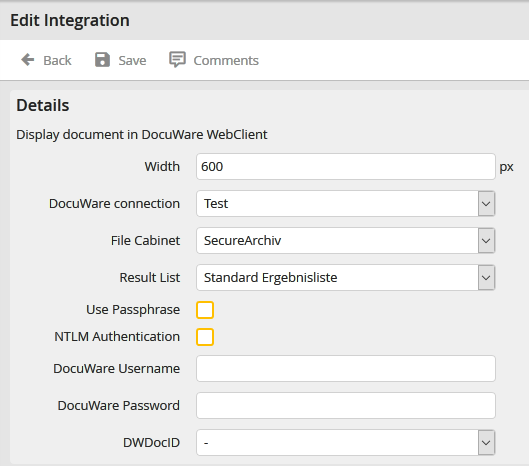
Setting up the DocuWare WebClient (DocuWare Version ≥ 6.5)
Property |
Description |
|---|---|
Width |
Specify the width (in pixels) of the document display in pixels. |
DocuWare Connection |
Choose the DocuWare connection in which the action should be executed. This default connection will automatically be suggested when a rule is created. |
DocuWare archive |
Selection of DocuWare archive |
Result list |
Selection of the DocuWare result list. If no result list was selected, the DocuWare default result list will be used. |
Using a passphrase |
Activates the encrypting of the URL used to access the WebClient using the DocuWare passphrase set in the configuration. |
NTLM authentication |
The web client integration has to be started with the windows authentication. |
DocuWare username |
Username of the permanently defined DocuWare user for the web client call-up. |
DocuWare password |
Password for the DocuWare user. |
DWDocID |
From the DWDocID drop-down list, select the process table field that contains the DocuWare Doc ID to be displayed. |
Click Save to save your settings. You will be taken back to Edit Integration.
Configuration of the DocuWare connections version < 6.5
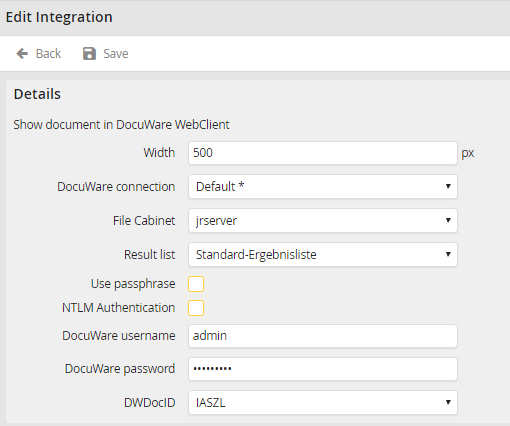
Setting up the DocuWare WebClient (DocuWare Version < 6.5)
Property |
Description |
|---|---|
Width |
Specify the width (in pixels) of the document display in pixels. |
DocuWare Connection |
Choose the DocuWare connection in which the action should be executed. This default connection will automatically be suggested when a rule is created. |
DocuWare Web Instance |
From the list of available Instances, select the DocuWare Web Instance that you want to use. |
Web integration |
Next to Web integration, select the desired interface from the drop-down list. |
Using a passphrase |
Enables a DocuWare passphrase to be entered in order to encode the URL for the web client call-up. |
Passphrase |
DocuWare passphrase for the chosen web integration. |
NTLM authentication |
The web client integration has to be started with the windows authentication. |
DocuWare username |
Username of the permanently defined DocuWare user for the web client call-up. |
DocuWare password |
Password for the DocuWare user. |
DWDocID |
From the DWDocID drop-down list, select the process table field that contains the DocuWare Doc ID to be displayed. |
Please note: If DWDocID is not set, the integration is not displayed.
