|
jr_execute_dialog_function(string functionId, object userParameters, function successCallback, function errorCallback) |
Scroll Prev Top Next More |
This function allows executing PHP functions of the type Form function on the server. Afterwards, the return values can be used client side. All form elements will be disabled during an execution within an AJAX request.
Parameter |
Type |
Description |
|---|---|---|
functionId |
string |
Function name of the form function |
userParameters |
object |
Optional: An object with user defined parameters accessible by the form function using |
successCallback |
function |
Optional: Specifies a callback function (see examples) to be executed in case of success, if the form function and the AJAX request were executed successfully. See below for more details. |
errorCallback |
function |
Optional: Specifies a callback function that is executed in case of an error (see example), if an error occurred during the execution of the form function or the AJAX request. See below for more details. |
Example:
function executeDialogFunction() {
jr_execute_dialog_function('phpjrexecutedialog', { param1: 'value1', param2: 'value2' },
successCallback, errorCallback)
}
function successCallback(returnObject) {
var value1 = returnObject.result.return1;
var value2 = returnObject.result.return2;
}
function errorCallback(returnObject) {
alert(returnObject.message);
}
If successful, the successCallback will be called, which is specified as a parameter in the jr_execute_dialog_function function. This function has a parameter of the type object. This object includes all values that were set in the called PHP form function via $this->setReturnValue(…). You can use the point operator in the successCallback function to access the individual values.
If an error occurs, the errorCallback will be called, which is specified as a parameter in the jr_execute_dialog_function function. This function has a parameter of the type object. This object includes an error message that was generated by the called PHP form function. If you want to use the error message in the function, you have to use the point operator to access the return object.
The function name of the PHP form function you want to call has to be passed as the functionId parameter when calling the jr_execute_dialog_function:
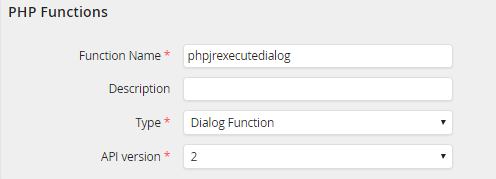
A detailed example for the interaction between the jr_execute_dialog_function function and a PHP form function can be found in the JobRouter manual about PHP functions.
Please note: If you have multiple JavaScript scripts in a process that contain the jr_execute_dialog_function, please ensure that the callback functions have unique names. Otherwise, it is not possible to ensure which callback function is called.
