Here you can define the paths to JobRouter directories. It is possible to outsource all listed directories. In this case you have to adjust the paths here. The paths can also be UNC paths that refer to a different server.
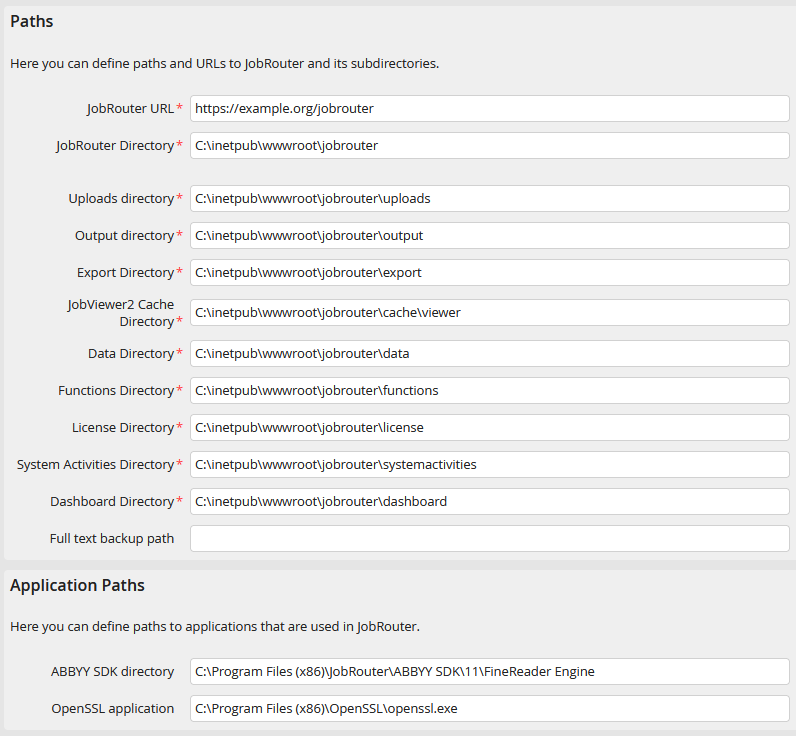
Define paths
In all cases, you must ensure that the user under which the web application is running has read and write permission for these directories.
Paths |
|
|---|---|
JobRouter URL |
•Enter the URL JobRouter can be accessed from in the browser.
Please note: The JobRouter URL is also relevant for calling the REST API.
Please note: Do not use spaces in the JobRouter URL. JobRouter does not support this. |
JobRouter Directory |
•Indicate the directory in which you installed JobRouter. •Used by JobRouter services, for example to access file attachments. |
Uploads directory |
•Choose a directory where file attachments should be stored. •All files attached to JobRouter instances will be deposited here. |
Output directory |
•The export directory for JobRouter files can be chosen freely. •For example, the JobRouter log files or PDF files will be stored here. |
Export directory |
•The export directory for JobRouter files can be chosen freely. •For example, exported processes or instances will be stored here. |
JobViewer2 Cache Directory |
•The directory for JobViewer2 cache files can be chosen freely. •The directory is used for caching images that are used to display documents in JobViewer2 |
Data directory |
•The directory for JobRouter files can be chosen freely. •All process related data, documents, scripts etc. will be stored here by the process designer. |
Functions directory |
•The directory for JobRouter files can be chosen freely. •JobRouter PHP-functions will be stored here. |
License path |
•The directory for the JobRouter license file can be chosen freely. |
System activities path |
•The directory for JobRouter system activities can be chosen freely. |
Dashboard path |
•The directory for dashboard widgets can be chosen freely. |
Full text backup directory |
•The directory for the backup copy of the full text support is freely selectable. |
Please note: When changing a directory, make sure that the access permissions for the new path are set correctly.
Here you can specify the paths for installing the ABBYY OCR as well as the OpenSSL application if you are using JobRouter with SSL encryption or an SAP connection via the JobArchive Link for SAP interface.
Application paths |
|
|---|---|
ABBYY SDK directory |
•Path to the ABBYY SDK directory that is needed for OCR functions of some modules. |
OpenSSL application |
•Path to the OpenSSL application that is needed for functions of some modules. |
