You can adjust the basic settings of your JobRouter in General Settings. You can change settings for user logins or store custom links. Click Save after making your changes. You will get back to the Configuration Tool overview automatically.
By clicking on General Settings in the configuration tools overview of the JobRouter settings the following editing mask will be displayed:
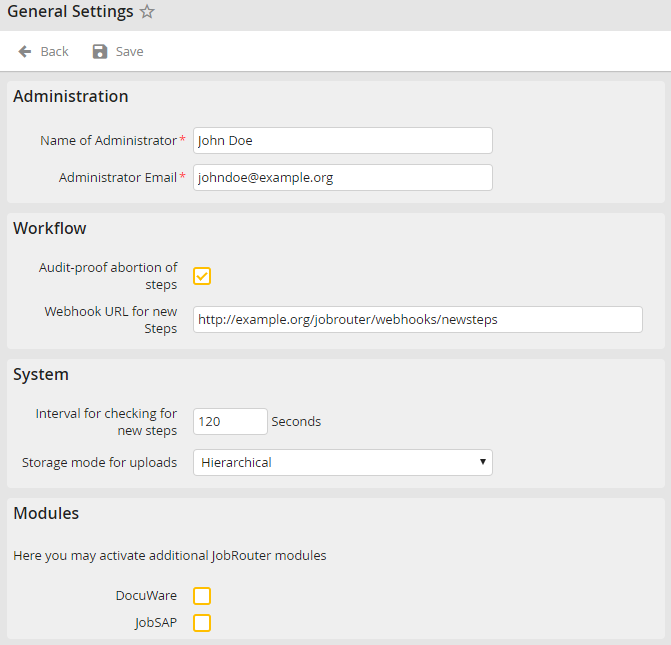
General Settings
The following settings can be made:
General Settings |
Definition |
|---|---|
Administration |
|
Name Administrator |
Insert the name of the JobRouter administrator here. |
Administrator e-mail |
Store the e-mail address of the JobRouter administrator here. |
Workflow |
|
Audit-proof abortion of steps |
Enables the audit-proof abortion of steps. If this setting is activated, a pop-up window is displayed when a step is aborted in the Steps Overview, allowing you to enter a comment. |
Webhook URL for new Steps |
A URL can be stored here, which is called up when there are new steps for processing in the JobRouter. The webhook URL is called once for each user who receives the new step. The following data is transferred to the webhook via POST: •username: The name of the user to whom the webhook is directed •process: The process name •version: The process version •step: The step number •workflowid: The workflowid of the step •simulation: If step is in simulator •incident: The instance number |
System |
|
Interval for checking for new steps |
Insert here the checking interval for the counter of the inbox. If this value is set, the counters will be updated automatically, according to the specified interval. |
Storage mode for uploads |
Here you can choose between the flat or hierarchical storage mode. |
Modules |
|
DocuWare |
Tick the checkbox to activate the DocuWare module.
Please note: You can only use this function if you have licensed the additional JobDocuWare module. |
JobSAP (optional module) |
Tick the checkbox to activate the JobSAP module. |
