Add a new connection by clicking New in the action bar. If you want to edit an already existing connection, click on the respective label. In both cases the following Edit Connection dialog window will be displayed.
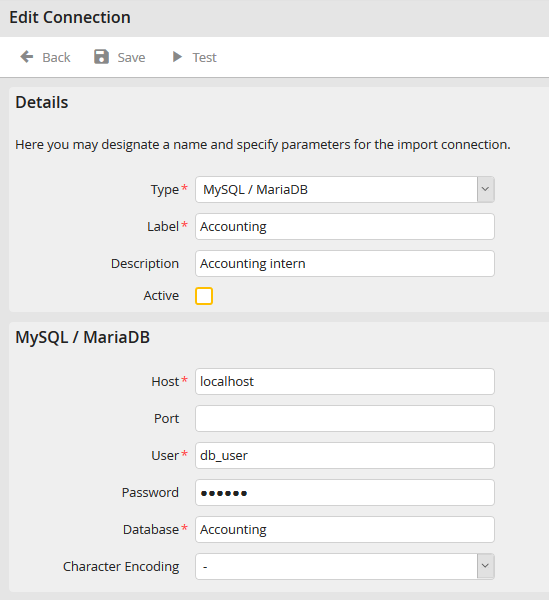
Editing an import connection
In the Details section, choose the desired database type in the drop-down list Type. Then assign a name to your connection in the Label field.
Please note: Once you have saved a name for a connection, it can no longer be changed.
Enter an additional description for your import connection in the Description field. Check the Active box to activate it.
The parameters of the previously selected database type of your import connection are defined in the next section. You may configure the following parameters for the various database types.
MySQL / MariaDB
Connection to a MySQL respectively MariaDB database.
Property |
Definition |
|---|---|
Host |
Enter the server name or its IP address. |
Port |
Enter the port number, under which the server is available. |
Users |
Assign a username for the database. |
Password |
Provide the password for that username. |
Database |
Give the name of the database used. |
Character encoding |
Choose the character encoding here in case the character set for the external database varies from the one used for the JobRouter database. |
Oracle
Connection to an Oracle database.
Property |
Definition |
|---|---|
Host |
Enter the TSN-name of the connection or the full connection string of the server. |
Users |
Assign a username for the database. |
Password |
Provide the password for that username. |
Database |
Give the name of the database used. |
Character encoding |
Choose the character encoding here in case the character set for the external database varies from the one used for the JobRouter database. |
SQLSRV
Connection to a database on a Microsoft SQL Server.
Property |
Definition |
|---|---|
Host |
Enter the server name or its IP address. |
Port |
Is the server, on which the database runs, not accessed through the default port, enter the relevant port. |
Users |
Assign a username for the database. |
Password |
Provide the password for that username. |
Database |
Give the name of the database used. |
Character encoding |
UTF-8, as SQLSRV performs the character encoding conversion from UTF-8 to the database character set automatically. |
ODBC
Connection to an ODBC-compliant data source.
Property |
Definition |
|---|---|
ODBC Type |
Choose a database type from the drop-down menu. |
Name |
Enter the name to the ODBC data source (DSN). |
Users |
Assign a username for the database. |
Password |
Provide the password for that username. |
Character encoding |
Choose the character encoding here in case the character set for the external database varies from the one used for the JobRouter database. |
