Add a new directory connection by clicking New in the action bar. If you want to edit an existing directory connection, click on the required name. In both cases the Add/Edit LDAP Directory dialog window will be displayed.
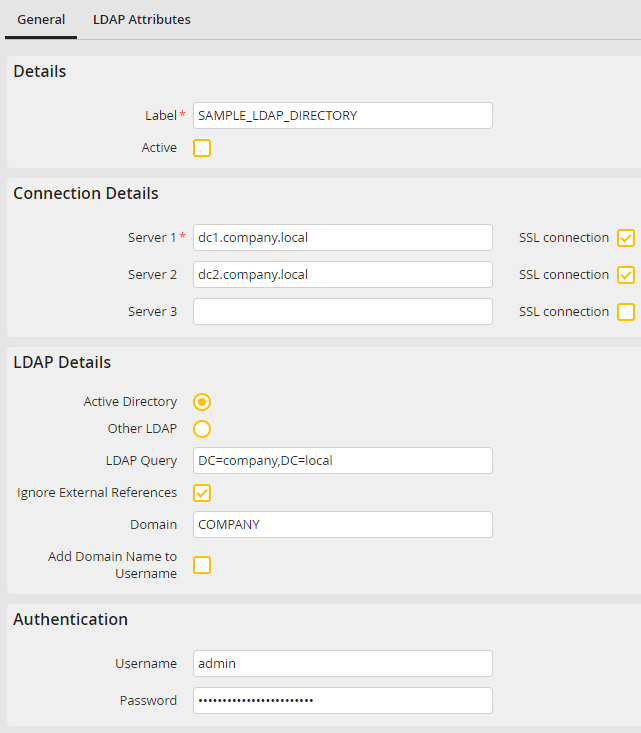
Add/edit a directory connection
LDAP Directory |
Definition |
|---|---|
Details |
|
Label |
Assign a name to the LDAP directory. |
Active |
Tick the checkbox to activate the synchronization. |
Connection details |
|
Server 1 - 3 |
Enter the address of the server hosting the LDAP directory. |
SSL connection |
Specify whether authentication via LDAP should be performed using SSL. The LDAPS communication runs on port 636. To use a different port, this can be appended to the server address in the format server_name:port_number.
Please note: For the correct SSL connection to be established, the domain certificate must be stored as trusted on the JobRouter and service servers. If these servers are located within your domain, this is usually done automatically via a respective domain policy. For standalone servers (especially Linux servers) the certificate must be manually added to the trusted certificates. For a detailed description of how to do this, please refer to the official manual of the operating system in use.
Please note: If the connection to a LDAPS server fails, this may happen due to the fact that the SSL certificate of the server cannot be validated.This happens often in case of self-signed certificates. In such a case, the following procedure should solve the problem: 1.Create new configuration: C:\OpenLDAP\sysconf\ldap.conf (Windows) or /etc/openldap/ldap.conf (Linux) 2.The website user must have read access for the configuration file Der Webseiten-Benutzer muss Lese-Rechte auf die Konfigurationsdatei haben 3.Place the following line at the beginning of your configuration file: TLS_REQCERT never 4.The restart the web server |
LDAP Details |
|
Active Directory |
Choose this setting to use Microsoft Active Directory |
Other LDAP |
Choose this setting to use another directory service. |
LDAP Query |
•Specify the point of access, where the search in the directory should be started. •For Active Directory this is usually a domain (e.g. „dc=company,dc=local“), in other directories it is often an organization (e.g. „o=COMPANY“). |
Ignore external references |
Enable the checkbox, if a part of the search results can be found in an external directory you don't have access to. Thereby the external references will be ignored during the search, while the synchronization is executed. |
Domain |
•Enter your domain name. •The name will be automatically taken into the User Administration under Single Sign-on (e.g. company\jdoe). |
Include domain name in usernames |
Select this checkbox if you want to synchronize JobRouter with multiple directories that may include multiple users with the same user name. The user name will be stored to JobRouter in the "Domain/User Name" format. |
Authentication |
|
Username |
Specify a username the JobServer service should use to access the directory service. Active directory uses the "Domain/User name" syntax, other directory services require the LDAP syntax (e.g. "cn=Admin,ou=IT,i=COMPANY"). Please note: If the user set in the service management to be used by the JobServer service already has this right, no username is required here (only for Active Directory). |
Password |
Enter the user password. |
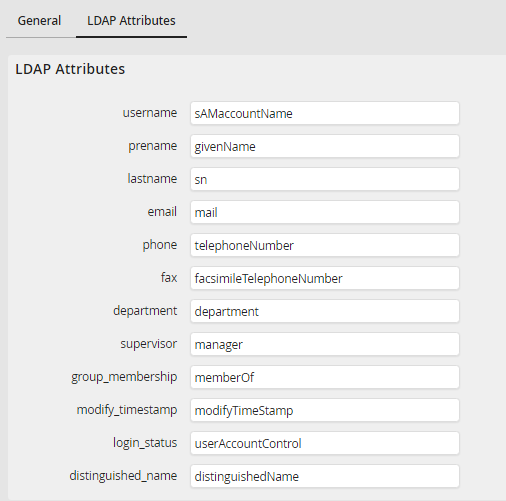
Add/Edit LDAP attributes
LDAP Attributes |
|
|---|---|
Multiple Attributes |
Here the link between the individual LDAP attributes and the JobRouter database fields is defined. They can be adapted for different LDAP implementations. |
Please note: LDAP attributes may only be changed if they differ from the suggested default values in your LDAP implementation. Wrong attribute mappings may cause synchronization failure, especially for username, supervisor, group_membership or distinguished_name.
Click Save to save all your changes. You will be automatically redirected to the LDAP directory administration.
