Please note: If the entry Database is selected for the Full-text engine option, the full-text search component must be installed by a system administrator when using Microsoft SQL Server. You can find instructions in this Blog post.
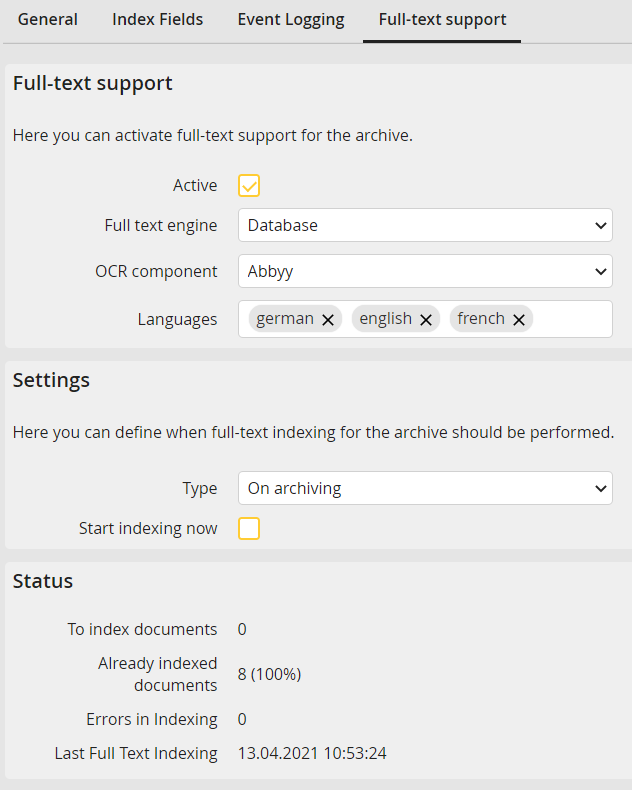
Edit archive - Full-text support tab
Here you can enable full-text support for an archive and determine when the necessary indexing should be started for full-text search. In addition, you can select the full-text engine and OCR component to use. For large archives, the full-text engine Database is recommended in combination with SQL Server or Oracle, but it must be taken into account that the database engine can lead to a large memory requirement on the database server (possibly several gigabytes, depending on the number and type of documents per 1,000,000 pages in the full text index is about 10 GB of memory).
The conversion of an existing archive requires the new indexing of all archived documents. This may be quite time-consuming. If you convert from the full-text engine Database to Elasticsearch, you can use the Data transfer of archived full-text data from Database to Elasticsearch tool to transfer the already indexed documents without having to index them again.
Please note: As of version 5.2 Zend-Lucene full-text engine is no longer available and is going to be completely removed in version 5.3. Archives using Zend-Lucene are still working, though we recommend to switch to another, alternatively offered full-text engine.
To improve recognition, up to four languages can be specified for the Abbyy OCR component. Only one language can be defined for the Internal component. If no language is selected, the JobRouter default language is used.
Please note: Selecting the appropriate languages improves text recognition, while each additional language slows down the OCR process. Zend Lucene is not suitable for languages that use non-Latin characters.
File formats that are supported for full-text: pdf, png, jpg, tiff, xls, xlsx, doc, docx, ppt, pptx, rtf, eml and msg.
Please note: For e-mail files (eml and msg) only their header data, subject and text are processed.
If the Oracle installation is case-sensitive, this also affects the entry of search terms in full-text search.
Since the Oracle text index is not synchronized automatically, a database administrator must create a task for the regular synchronization of this index.
You can configure the interval for indexing documents of the archive in the settings. Select the value On archiving, Time interval or Time in the Type picklist.
Select On archiving to start the indexing of a document in minimum time after being archived.
Select the value Time interval to execute indexing in a regular interval (e.g. each hour). In this case you may specify a start time and end time between in which the indexing is executed.
Alternatively, choose Time to execute the indexing at a certain time (e.g. daily at 8 p.m.).
Activate the Start indexing now checkbox to execute the indexing of the archive immediately.
The Status section displays how far the indexing progressed and if errors occurred during indexing.
