A new archive can be created by clicking on New in the action bar of the Manage Archives mask. If you want to edit an already existing archive, click on its name. In both cases the Edit archive dialog window opens.
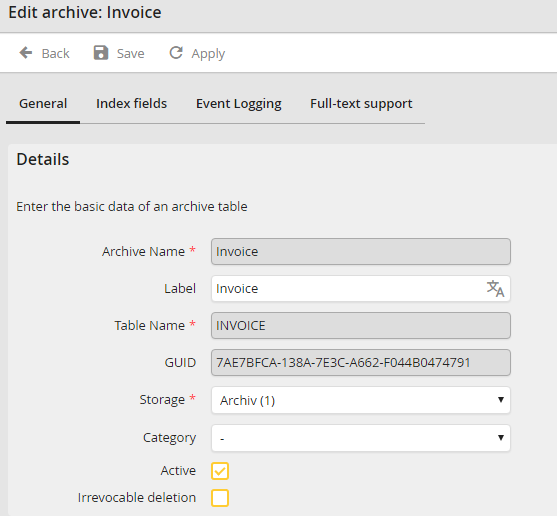
You may configure the following settings.
Details |
Definition |
|---|---|
Archive Name |
Please enter a unique name for the field. This name will only be used internally (e.g. when defining archive views or system actions). |
Label |
Enter a label for the archive here. You can add translations in other languages (only with licensed module JobMultilingual). |
Table Name |
Enter a table name for the archive table. The archive table stores all index data of the archived documents. |
GUID |
GUID of the archive. Will be automatically generated during archive creation. |
Storage |
Select the data storage that is to be used to store the files. |
Category |
Choose a Category. This category will be used as standard value for the Archive Views. |
Active |
Select this checkbox to activate the archive. This means all active Archive Views will be displayed and documents can be archived or searched. You cannot search or use System Activities in an inactive archive. |
Irrevocable deletion |
Select this checkbox to delete the physical document data. Otherwise they will only be marked as deleted during deletion. |
Click Apply in the action bar to save your settings.
