In several categories of JobRouter, e.g. in the inbox, substitution box or tracking box, an instance history can be opened for single steps. This history can be opened by clicking on the symbol  . A pop-up window opens. You will see the complete history of the selected instance.
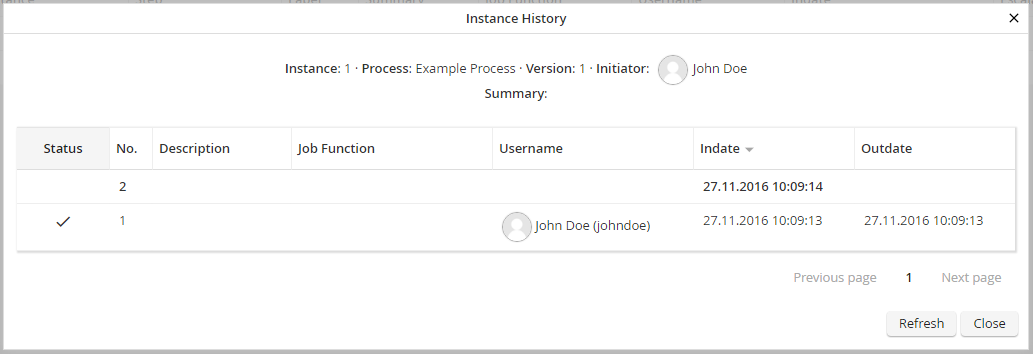
Instance History
Click on a row to open the dialog of the corresponding step. You can review the entered data. You can only edit steps that require processing, if you have the appropriate rights to edit this step.
The instance history displays the following instance information.
Instance history |
Definition |
|---|---|
Instance |
Number of the selected instance. |
Process |
The process name. |
Version |
The process version. |
Initiator |
The username that started the instance. |
Subject |
A summary of the instance content if defined. |
Status |
Current status of the step. |
Step |
Number of the step. |
Description |
Label of the step. |
Job Function |
The Job Function which was assigned to the step. |
Username |
The username that processed the step. |
Indate |
Date when the step arrived in the inbox. |
Outdate |
Date when the step was completed. |
