In the General Settings section, enter the basic settings for the DocuWare connection.
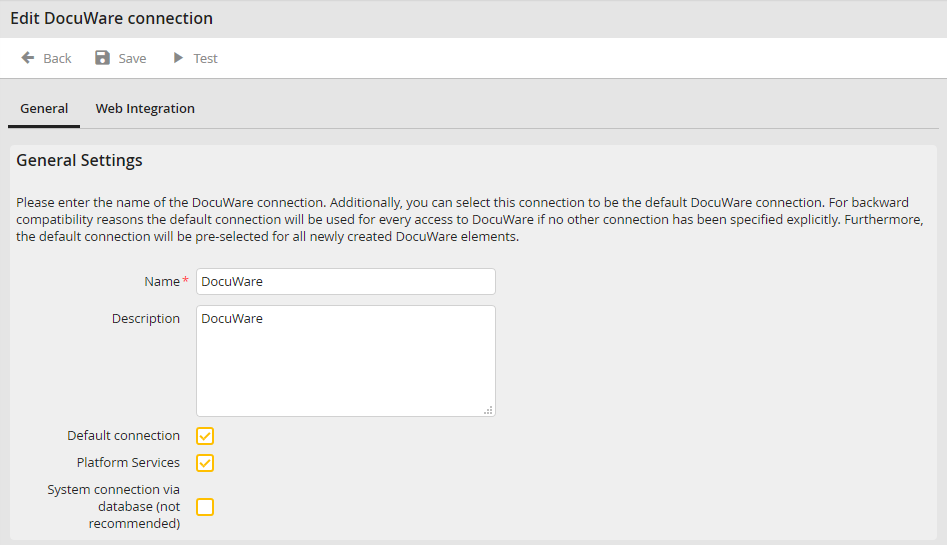
DocuWare Manage connections: General settings
Setting |
Description |
|---|---|
Name |
Enter the connection name. |
Description |
The connection can be described here. |
Default connection |
Additionally it is possible to set the connection as default connection. It will be used for all DocuWare system accesses by default, if no other connection was selected explicitly. Only one default connection can be defined. The first established DocuWare connection of the system will be used as default connection automatically. |
Platform Services |
By selecting the checkbox Platform Services, you determine that the selected connection communicates with a DocuWare system whose product version is ≥ 6.5. This has an effect on further configuration settings, e.g. the Web Instance tab will be hidden and the Web Integration tab will be displayed instead. To learn more about the different configuration details, please see the following chapters. |
System connection via database (not recommended) |
The DocuWare archive settings are read via the DocuWare Platform Services by default. That is why this checkbox should only be activated for DocuWare versions < 6.7 or for existing connections. |
