In the DocuWare System section, you can define the connection data that can be used to read DocuWare archive settings.
DocuWare Platform Service is usually used for this purpose.
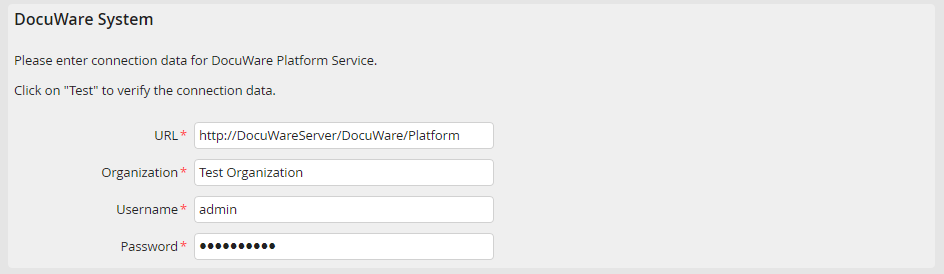
DocuWare System: Connection via Platform Service
Setting |
Description |
|---|---|
URL |
DocuWare Platform Services URL. Generally http(s)://<DocuWare Server>/DocuWare/Platform. |
Organization |
DocuWare organization. |
User |
Name of a DocuWare user who has all rights needed for DocuWare archive access. |
Password |
Password of the DocuWare user. |
Test your connection by clicking Test in the action bar. You will receive an according status message. If the test is successful, some further configuration fields will be filled in additionally.
Alternatively it is possible to create a direct connection to the DocuWare database. Though this should only be used for DocuWare version < 6.7 and the existing connection.
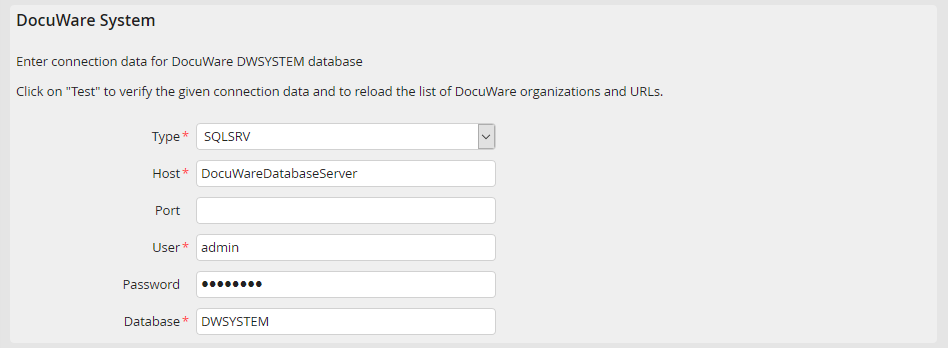
DocuWare System: Database connection
Setting |
Description |
|---|---|
Host |
Enter the name or IP of the database server. For ORACLE a complete TNS connection string can be entered. Not available for ODBC. |
User |
Specify a username for the database. |
Password |
Enter the user password. |
Database |
Specify a name for the used database. Generally it is DWSYSTEM. Only available for MySQL respectively MariaDB and SQLSRV. |
Port |
If you are not using a default port, enter the number of the port, which is addressed via the server. This setting is only available for MySQL respectively MariaDB and SQLSRV. |
ODBC Type |
Select a data type (MSSQL, MySQL respectively MariaDB or ORACLE) for the ODBC interface via the selection menu. Only available for ODBC. |
Name of the data source |
Enter the ODBC data source name. Only available for ODBC. |
Character encoding |
If the DocuWare database has a character set, which differs from the JobRouter database, then enter it here. Not available for SQLSRV. |
Please note: If the DocuWare ORACLE database is set case sensitive, the entry db_case_sensitive has to be set on the type jr in the JRSETTINGS table and the value has to be set 1. Then delete the cache/jrsettings folder to activate the change.
