Edit a task by clicking its name. The following dialog window will be displayed.
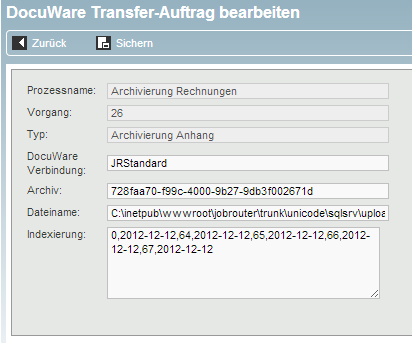
Editing a DocuWare Transfer task
The Process name and Instance fields show the process and instance to which the task belongs. The field Type shows the type of task, such as archiving or tagging.
Please note: The values in the Process name, Instance and Type fields cannot be changed.
You may edit the values in the fields Archive, Search filter, Filename, and Index.
Task Property |
Description |
|---|---|
DocuWare Connection |
Choose the DocuWare connection in which should be used for the action. |
Archive |
Specify into which archive the task should be written. |
Filename |
You can name a file to be archived along with the task. Enter the path to the file. |
Search filter |
Provide the search pattern that uniquely identifies the DocuWare document. |
Index |
You may edit the values in the individual index fields or enter new values. |
The Search and Index String
DocuWare Platform Service addresses the fields in the file cabinet by their internal names and GAPI by their numbers. The value is separated from the field number with a comma (field, value). A list of values likewise uses commas to separate the values.
Example Platform Service: fieldname1,invoice1,fieldname2,invoice2,fieldname3,invoice3
Example GAPI: 20,invoice1,30,invoice2,40,invoice3
For a search string, numeric data and dates are expressed as ranges, that is, as a lowest and highest value, likewise separated by commas.
Search string range example: 96,100,96,150
If a value has an embedded comma, it must be escaped with a preceding backslash.
Search string range example with embedded comma: 20,Müller\,Hans,96,100.100
If you made changes to a task, clicking Save will reactivate it, and it will be available in the transfer protocol list for processing, again.
