Web integrations are no longer supported from DocuWare version 6.5 on. Due to this, the DocuWare form elements and the form integration will not display the web instance and integration selection but instead an archive list. For this reason, the DocuWare migration tool can be used to convert the web integrations in one place.
The DocuWare Migration link is visible, if at least one DocuWare connection is not using the Platform Servicess yet.
Please note: If you want all changes done in the process of migration to be written into a log file, you have to define the constant CONST_LOG_LEVEL_FILE with the value NOTICE in the central JobRouter configuration file config.php:
define('CONST_LOG_LEVEL_FILE', 'NOTICE');
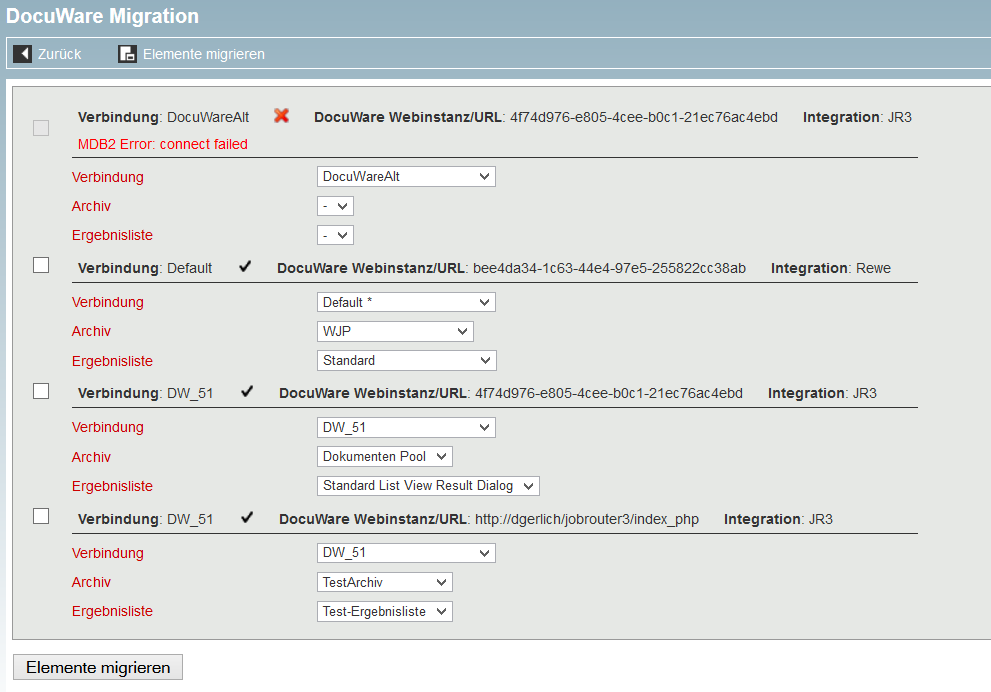
Clicking on DocuWare Migration menu entry, all web integrations used in JobRouter processes and JobSelect reports will be listed, sorted by the DocuWare connection, web instance or URL and integration. There you can select the desired connection, the archive and the result list. The checkboxes can be used to select multiple web integrations for the migration. Only the elements using the marked web integrations will be migrated.
You will be reminded to create a database backup when clicking on Migrate Elements.
After the successful migration a message appears in the main area of the JobRouter configuration page. Details about the migration process can be found in the log file called docuware-yyyy-mm-dd.log, which can be found in the log subdirectory of the JobRouter output directory.
If a DocuWare connection cannot be reached, i.e. due to a wrong password, a notification will be displayed and the corresponding web integrations cannot be converted. If this is the case, the respective checkboxes will be deactivated.
After the migration of all web integrations, you can update DocuWare to version 6.5. The new settings will only be used afterwards for DocuWare elements.
