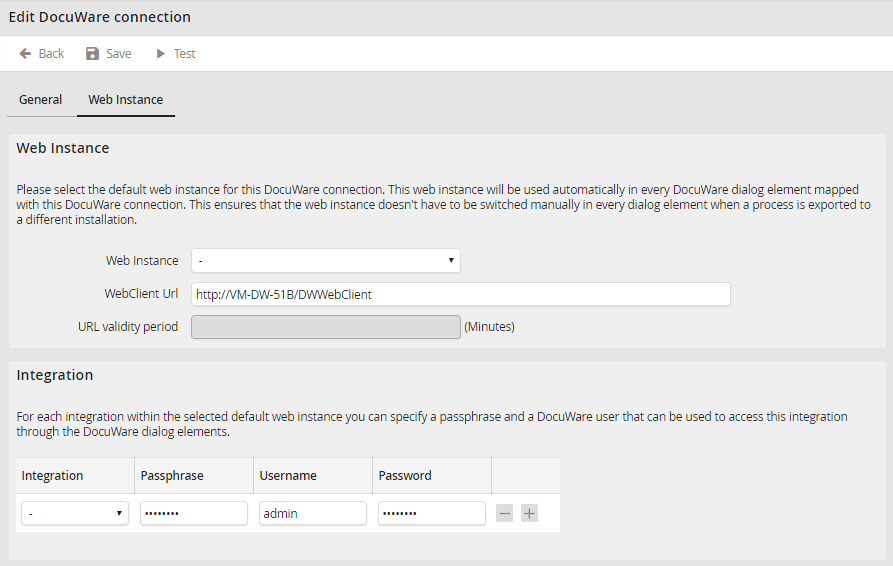
Optionally you can set up a default web instance for each DocuWare connection. This web instance will automatically be used in the form elements linked to this DocuWare connection. This ensures that web instances do not have to be changed manually in every form element if the process was ever imported on another system.
Web instance settings |
Description |
|---|---|
Web Instance |
The default web instance of a connection |
WebClient URL |
The URL of the default web instance. It will automatically be determined according to the chosen web instance. |
URL validity period |
Optionally the validity period for the created DocuWare URLs can be entered for each web instance. If this value is set, an in JobRouter generated URL (DocuWare-Show-Document form elements) will only be valid for the entered period of time. |
Additionally to the general settings you can enter a passphrase as well as a DocuWare user for each integration of the chosen default web instance. These can be used in the DocuWare form elements to access this integration.
Web integration settings |
Description |
|---|---|
Integration |
Choose the integration to be effected by the settings. |
Passphrase |
Enter the DocuWare passphrase for the integration, provided that it has been defined in DocuWare. |
Username |
In case the individual documents of the integration should not be accessible by NTLM or guest login, you can enter a default user for the DocuWare login. |
Password |
Password for the DocuWare user. |
