If the system connection was set up via DocuWare Platform Services, a single field URL can be found in this section.

System actions and rules: URL
Generally, it is identical to the URL of the DocuWare System section.
If the system connection is set up via a database connection, the following settings are required:
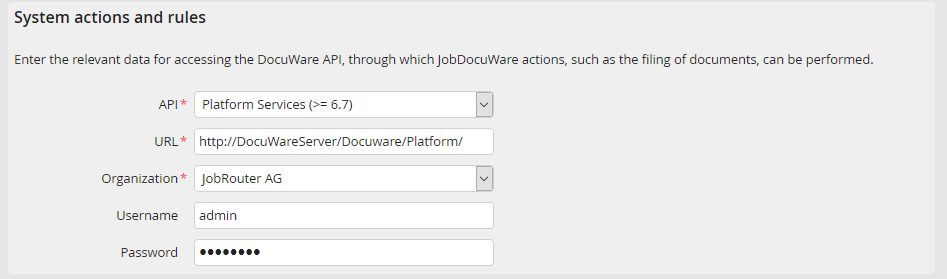
System actions and rules: Datenbase connection
To be able to perform DocuWare actions in System actions and rules, an existing DocuWare user has to be specified. This technical user will be used to perform actions in DocuWare via the API interface. Therefore, the user should have all the rights on the DocuWare system that are needed for the desired actions (e.g. store, delete, ...).
JobDocuWare setting |
Description |
|---|---|
API |
API to be used for the communication with DocuWare. |
URL |
URL of DocuWare Platform Services (only displayed if the entry Platform Services was selected in the field API). |
Host |
Name or IP of the DocuWare server (only displayed if the entry GAPI was selected in the field API). |
Port |
Port of the DocuWare server (only displayed if the entry GAPI was selected in the field API). |
Organization |
DocuWare organization. |
Username |
DocuWare username for the access on the API. |
Password |
DocuWare user password. |
Please note: If the DocuWare connection of GAPI is changed to Platform Services and there are system actions and rules that are used by the connection, then the index fields in this system actions or rules are converted automatically and irreversibly into Platform Services structure as soon as the connection is saved.
The API cannot be changed to GAPI by the Platform Services if this connection is currently used by a system action or rule.
