Use the Field assignment tab to assign information from the emails to the index fields used for archiving. The field assignments defined here are displayed in the storage mask.
Field assignment
Please note: Currently it is still necessary to include an index field in the Store dialog even if the fields value is assigned via field assignment. If the user is not to change this field, it can be set as write-protected in the definition of the index dialog. For example, this might be the case for the unique ID of an email.
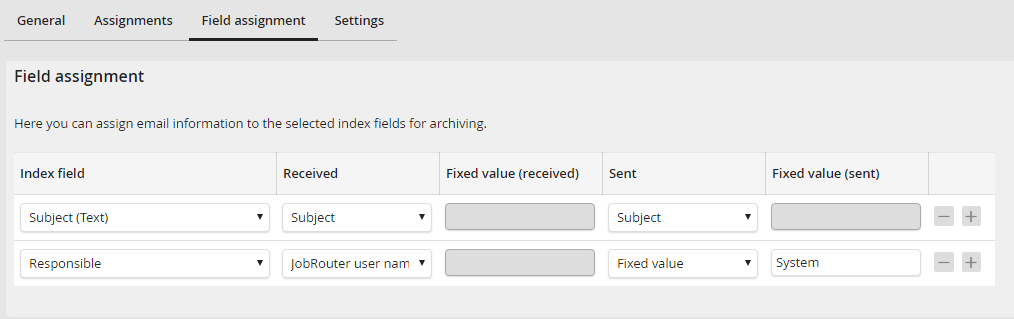
Field assignment
This section contains the following settings:
Property |
Explanation |
|---|---|
Index field |
A pick list of the system fields and index fields of the archive selected in the General tab. |
Received |
A pick list with the assignment options for received emails. |
Fixed value (received) |
A fixed value can be entered here, if Fixed value was selected in the previous column. |
Sent |
A pick list with the assignment options for sent emails. |
Fixed value (sent) |
A fixed value can be entered here, if Fixed value was selected in the previous column. |
The following options are available in the picklist of the received and sent columns:
Option |
Explanation |
|---|---|
General |
|
Fixed value |
Enter a string into the columns fixed value (received) or fixed value (sent). That value will be assigned to the selected index field. |
Unique random value |
A unique random value. |
JobRouter user name |
This option assigns the user name of the user currently logged into JobRouter to the index field. |
Email header |
|
Sender address |
The SMTP address of the email. |
Sender name |
Name of the sender |
To |
The SMTP addresses of the recipients. |
CC |
The SMTP addresses of the CC recipients. |
Subject |
The subject of the email. |
Unique email ID |
JobMailConnect uses this ID to check if the email was already archived by another user who received the same email. |
Received date |
The date the email was received. |
Sent date |
The sent date of the email. |
Email content |
|
Attachment name |
If attachments are archived, this option can be used to write the file name (without extension) into an index field. |
Attachment type |
If attachments are archived, this option can be used to write the file type (the file extension) into an index field. |
Attachment name and type |
If attachments are archived, this option can be used to write the entire file name (name and extension) into an index field. |
Mail text |
The message text of the email. |
Outlook |
|
Current user email |
The email of the current user will be assigned |
Outlook user |
The Outlook user will be assigned. |
The company of the sender from a configured address book, using the email address. If no contact exists with this email address, JobMailConnect will automatically search for a contact with the same email domain.
Please note: The assignment is only possible, if in the tab Settings the reading of contact folders is activated. |
|
The name of the sender from a configured address book, using the email address.
Please note: The assignment is only possible, if in the tab Settings the reading of contact folders is activated. |
|
Folder name |
The name of the folder the email is in. |
Please note: If the content of a field is larger than the length of the respective index field, the field content will be shortened to the maximum length.
