As soon as JobLink was licensed for Office, the module is displayed in Configuration -> Modules.
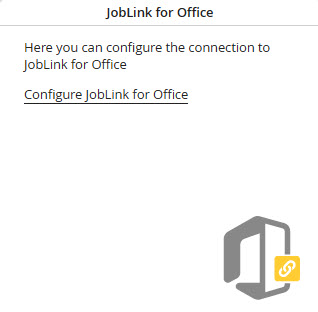
JobLink for Office
Click Configure and insert your Office Online installation URL in Office Online Server Discovery URL in the new window.
Override base URL: This is the endpoint URL for Microsoft. It is required if JobRouter is used in the cloud.
Must only be entered, if it differs from the JobRouter URL. If you don't know your endpoint, please contact your JobRouter support (Cloud Team).
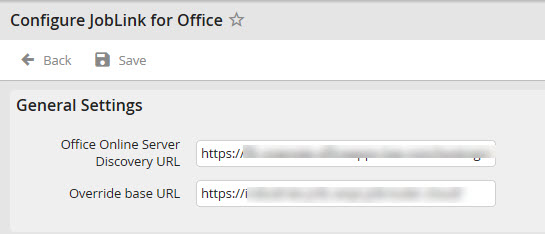
JobLink URL
Please note: The Office Online Server Discovery URL is the URL to your locally installed Office Online server or to Microsoft Office 365, if you are using this.
The Override base URL is not required in case of a locally installed Office Online server.
Providing of an Office Online server - Office Online server
https://docs.microsoft.com/de-de/officeonlineserver/deploy-office-online-server
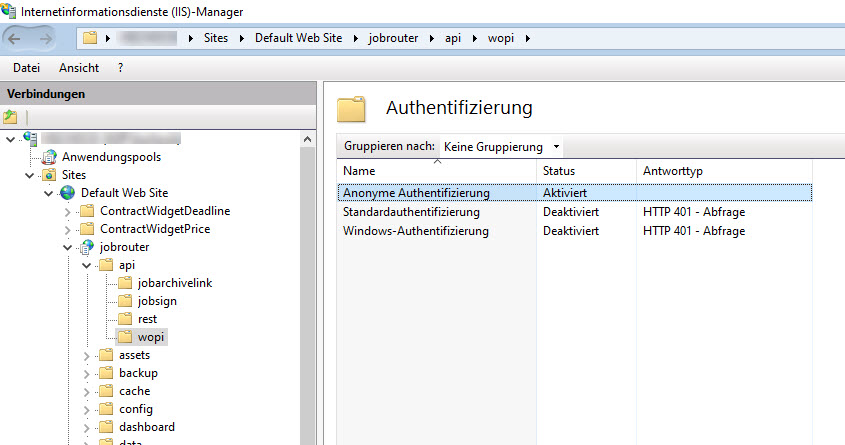
Please note: Please be aware of the fact that the Windows authentication on the Internet Information server (IIS) is disabled for the JobRouter folder wopi under C:\inetpub\wwwroot\jobrouter\api\wopi and the anonymous authentication must be activated.
Please note: If page contents, especially within the integration, are not loaded correctly, please check the settings in the web.config-jobrouter file. You will find this in the JobRouter main directory. The settings should be as shown in the screenshot below.
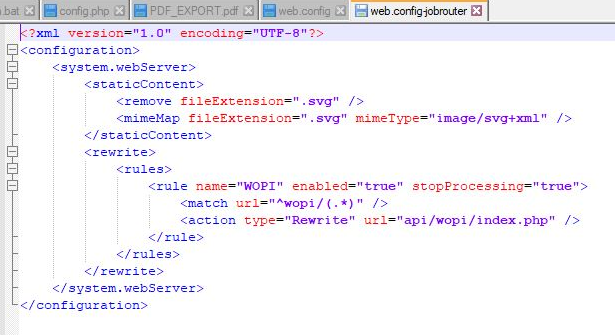
web.config-jobrouter
