All available rules have the same properties in their basic structure. The advanced properties, which may differ from rule to rule and by which rules can effect a most diverse range of actions, will be described in the following chapters.
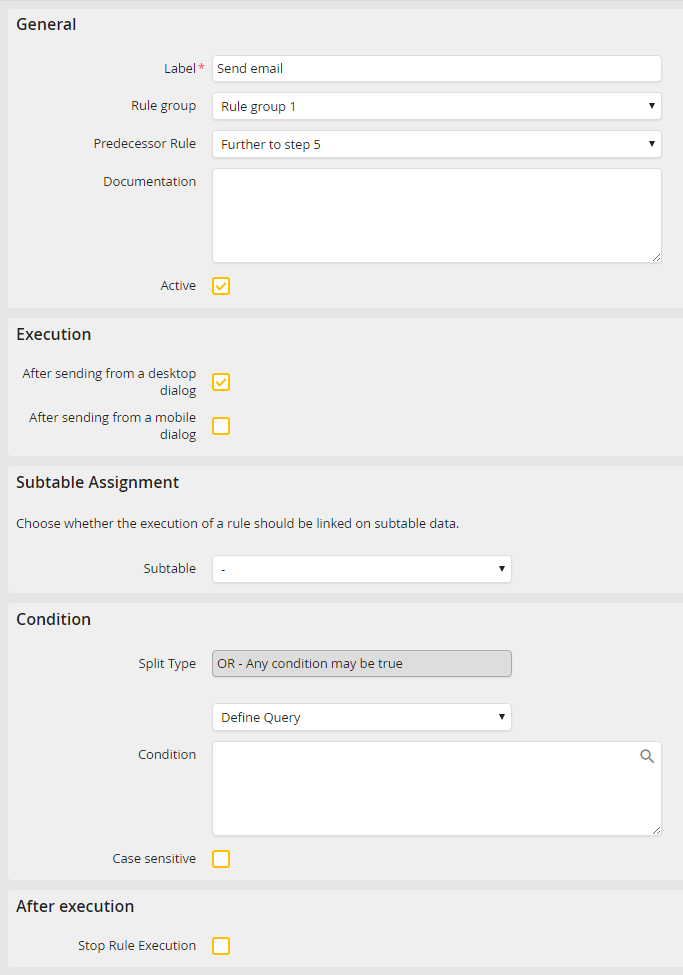
General rule structure
You can specify the following basic properties:
Please note: The section Execution is only visible for start steps and user steps. For a decision step in connection with an execution rule, this section is also available, but only with the option In simulation.
Rule property |
Description |
|---|---|
General |
|
Label |
Give a name to the rule. |
Rule group |
Add the rule to a rule group |
Predecessor rule |
Determine the order of the rules. The current rule will be executed after the predecessor rule or rule group. |
Documentation |
Add a description to your rule. |
Active |
If this box is checked, the rule will be enabled for execution. |
After sending from a desktop form |
If this box is checked, the rule will be executed after sending from the desktop form. |
After sending from a mobile form |
If this box is checked, the rule will be executed after sending from the mobile form. |
Subtable Assignment |
|
Subtable |
If you have created a subtable, it can be linked to the rule. This subtable assignment is not available for DocuWare rules, in which this function is replaced by a link to the corresponding archive. |
Condition |
|
Condition |
Set the conditions for the execution of the rule. •Always execute: The rule is always executed and not depending on specific values. •Define condition: Define an if-then condition (See chapter Define condition). •Define query: Formulate the condition for your rule (See chapter Define query). •Query function: If you have already created rule conditions (See chapter Create PHP functions), you can assign them to rules using a picklist. Here you can define if a rule should be executed with the return value true or false. |
After execution |
|
Stop rule execution |
If this box is checked, the rule execution is stopped. The following rules will not be processed. |
