You can define your input parameters on this tab.
Fields
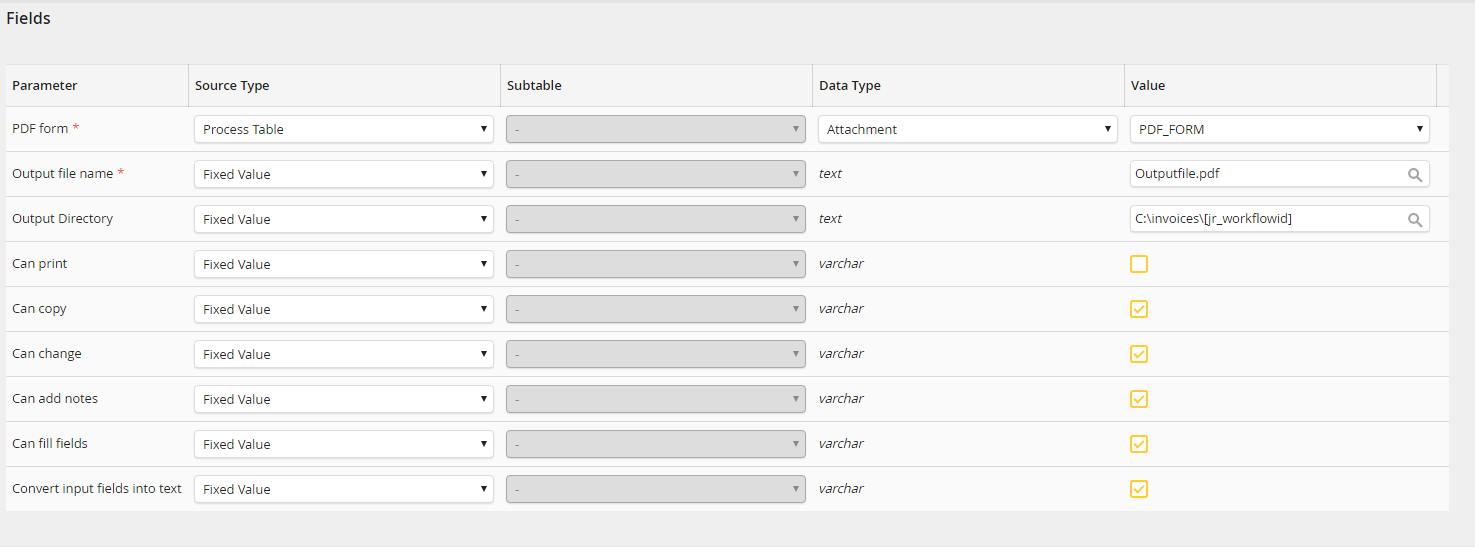
Input parameters: Fields
Path to the template file
A PDF form attached to the process has to be specified here, or alternatively the file path to an existing PDF form.
Output file name
The name for the output file has to be defined here. The name has to always end with the file extension .pdf.
Please note: Invalid characters in the file name are replaced by underscore. Which characters are replaced depends on the file system type.
Example (for Windows): (Process field)\invoice.pdf is replaced with Value_invoice.pdf
Output directory
An optional output directory can be defined here. If the directory does not exist, it will be created by the system activity.
Can print
Here can be defined if printing of the output file is permitted. A value of "1" permits printing. If nothing is configured, the default value "0" is used.
Can copy
Here can be defined if copying content of the output file is permitted. A value of "1" permits copying. If nothing is configured, the default value "0" is used.
Can change
Here can be defined if changing the output file later on is permitted. A value of "1" permits changing. If nothing is configured, the default value "0" is used.
Allow annotations
Here can be defined if adding annotations to the output file later on is permitted. A value of "1" permits annotations. If nothing is configured, the default value "0" is used.
Can fill fields
Here can be defined if filling fields later on of the output file is permitted. A value of "1" permits filling. If nothing is configured, the default value "0" is used.
Convert input fields into text
Define if the form fields of the PDF are to be converted to text fields. Already filled form fields can then no longer be changed. Set the value "1" to permit the conversion. If nothing is configured, the default value "0" is used.
Please note: This option is only intended for form fields of the type AcroForms.
Form fields

Input parameters: Form fields
Parameters
The ID of the form field of the PDF form that is to be filled has to be defined here. XFA forms require the full label of the form field to be entered here.
Value
The value used to fill the form field has to be defined here. This can be either a process table field, or a fixed value.
