The function group Fill Word template expects a Word file in docx format as template. The Merge Fields of this file can then be filled with content by the system activity.
To make the template available to the system activity.
Please note: Field names for merge files may not contain whitespaces, umlauts, or special characters. Otherwise the field will not be displayed on the configuration interface.
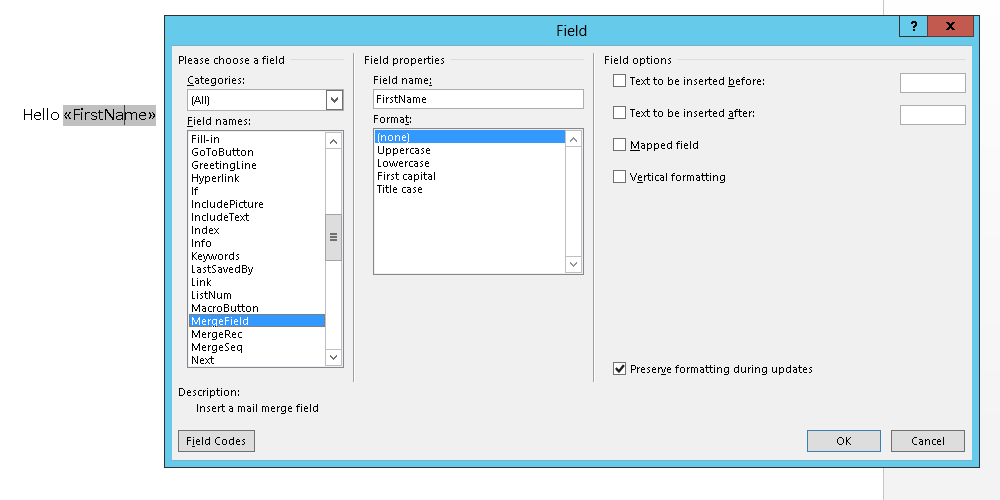
Definition of a merge field
To insert images into the template the merge fields can be marked with the prefix Img:. Now an image can be inserted into the JobRouter configuration via the system activities and by using attachment fields or file paths.
To be able to use data from a subtable to fill fields, the merge fields have to be defined in a Range. This range can be defined with special merge fields whose names have to begin with RangeStart: and RangeEnd:. The name of the range has to be entered after the colon. This name has to be unique in the Word document. Ranges can not be nested inside each other.

Definition of a table
Please note: If a template with a thin table frame is used to create a PDF file, the frame might not be displayed in some PDF viewers, depending on the zoom level. This is purely a visual problem of the respective PDF viewer and will not lead to errors when printing the document.
Please note: When using the prefixes Img:, RangeStart: and RangeEnd: no whitespace may be used directly after the colon.
Please note: Make sure the table setting Text Wrap in the Table Properties is set to None. Otherwise the automatic wrapping for table contents will not work.
The instance history can be defined as a table in a Word template. This table has to be defined in the range JR_IncidentHistory. This range will not be displayed in the configuration of the system activity, as all information comes directly from JobRouter. In the range of the instance history, the merge fields Step, Status, Description, Username, Jobfunction, InDate and OutDate can be added as columns.

Definition of the instance history
Merge field |
Description |
Step |
Placeholder for the step number. |
Status |
Placeholder for the status of the step. |
Description |
Placeholder for the description of the step. |
Username |
Placeholder for the user processing the step. |
Jobfunction |
Placeholder for the Job Function of the step. |
InDate |
Placeholder for the indate of the step. |
OutDate |
Placeholder for the outdate of the step. |
The merge fields Status and Description will be automatically translated to the language configured in the system activity. If the description of the step is not available in the respective language, the default language of the step will be used.
Please note: If you use images and graphics within a table in the Word template, they will not be saved in the PDF if these images were inserted in the With text wrap layout option. Please use the layout option With text in line instead if the images in a table should also be saved in the PDF.
