Open the Admin Tools by clicking Admin Tools in the JobRouter navigation menu.
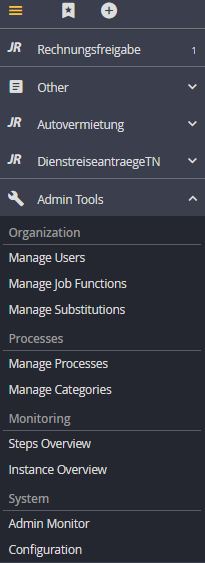
Admin Tools navigation
The individual JobRouter Admin Tools are grouped by theme and briefly described here to give you a quick overview over the JobRouter administration functions. From here you can access the various editing modes of the different tools directly.
Admin Tools |
Definition |
Organization |
With this tool JobRouter user and Job Function structures can be organized. The following tools are available: •Manage Users •Manage Job Functions •Manage User Profiles •Manage Substitutions |
Processes and Data |
Create, edit and manage JobRouter processes. The following tools are available: •Managing processes •Manage process categories •Manage tables |
Monitoring |
With this tool process owners can manage and monitor instances. The following tools are available: •View steps (Steps overview) •View instances (Instance overview) |
System |
With this tool further system settings can be made and monitored. The following tools are available: •Admin Monitor •Configuration |
