To enable the use of Elasticsearch for full-text indexing, you must specify the connection data to an Elasticsearch instance in this menu.
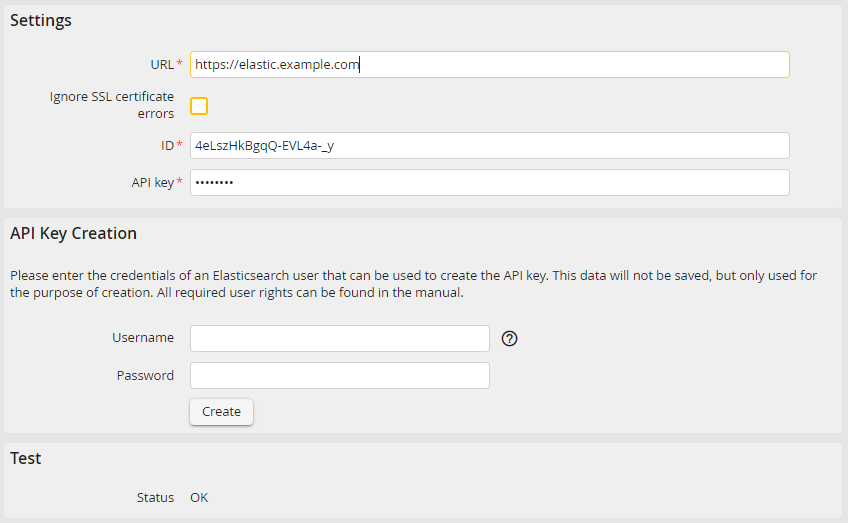
Elasticsearch: Configuration
You can make the following settings:
Setting |
Definition |
|---|---|
URL |
Here you can insert the URL of the Elasticsearch instance. If Elasticsearch is not configured under the default port 9200, it is necessary to explicitly state it. |
Ignore SSL certification error |
If this checkbox is activated, all SSL certification errors are ignored. Thereby, the trustworthiness of the connection will not be checked any more. |
API key and ID |
Here you can enter the Elasticsearch API key and the key ID. This setting is used for the authentication and authorization in the further communication between JobRouter and Elasticsearch. Please find the instructions for the creation of the API key in the Elasticsearch documentation. Alternatively it is possible to create this setting in this menu, though this can only be done by an Elasticsearch user with the respective rights: •cluster-related: manage_api_key, monitor •index-related: create, create_index, delete_index, manage, read, write |
Please note: If the connection to Elasticsearch is made via HTTPS, an SSL certificate for cURL requests is required in your PHP configuration (curl.cainfo setting).
Click Test in the action bar if you want to check the connection with the current entries. In case of a successful connection OK is displayed in Status field. Otherwise an according error message will be displayed.
Click Save in the action bar to save your settings.
