MySQL / MariaDB
Connection to a MySQL respectively MariaDB server.
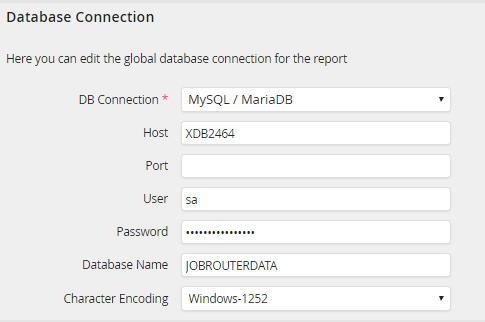
MySQL respectively MariaDB database
Property |
Definition |
|---|---|
Host |
Enter the server name or its IP address. |
Port |
Is the server, on which the database runs, not accessed through the default port, enter the relevant port. |
User |
Assign a username for the database. |
Password |
Provide the password for that username. |
Database Name |
Give the name of the database used. |
Character Encoding |
Choose the character encoding here in case the character set for the external database varies from the one used for the JobRouter database. |
Oracle
Connection to an Oracle server.
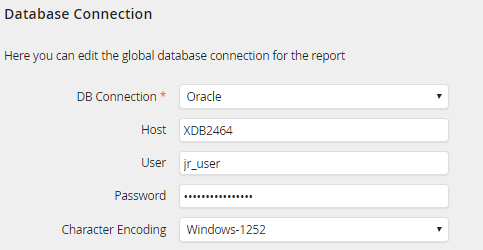
ORACLE database
Property |
Definition |
|---|---|
Host |
Enter the name of the connection (as set in tnsnames.ora) or a full Oracle connection string. |
User |
Assign a username for the database. |
Password |
Provide the password for that username. |
Character Encoding |
Choose the character encoding here in case the character set for the external database varies from the one used for the JobRouter database. |
ODBC
Connection to an ODBC-compliant data source.
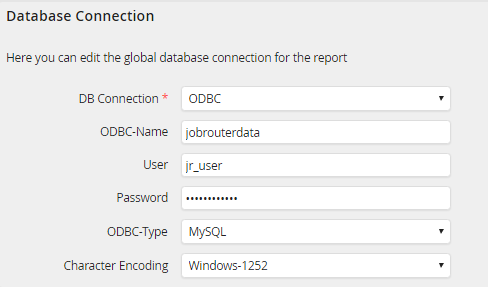
ODBC database
Property |
Definition |
|---|---|
ODBC Name |
Enter a name to the ODBC interface. |
User |
Assign a username for the database. |
Password |
Provide the password for that username. |
ODBC Type |
Choose a database type from the drop-down menu. |
Character Encoding |
Choose the character encoding here in case the character set for the external database varies from the one used for the JobRouter database. |
SQLSRV
Connection to the Microsoft SQL Server via the SQLSRV extension.
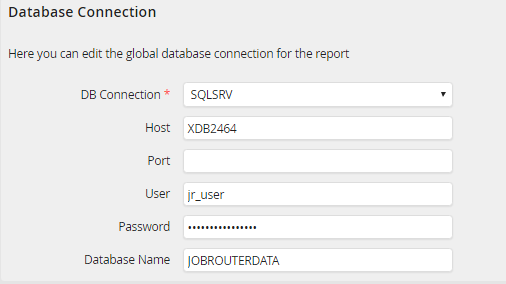
SQLSRV database
Property |
Definition |
|---|---|
Host |
Enter the server name or its IP address. |
Port |
Is the server, on which the database runs, not accessed through the default port, enter the relevant port. |
User |
Assign a username for the database. |
Password |
Provide the password for that username. |
Database Name |
Give the name of the database used. |
