You may view and edit individual e-mail messages by clicking on the message. The Edit e-mail dialog window is displayed.
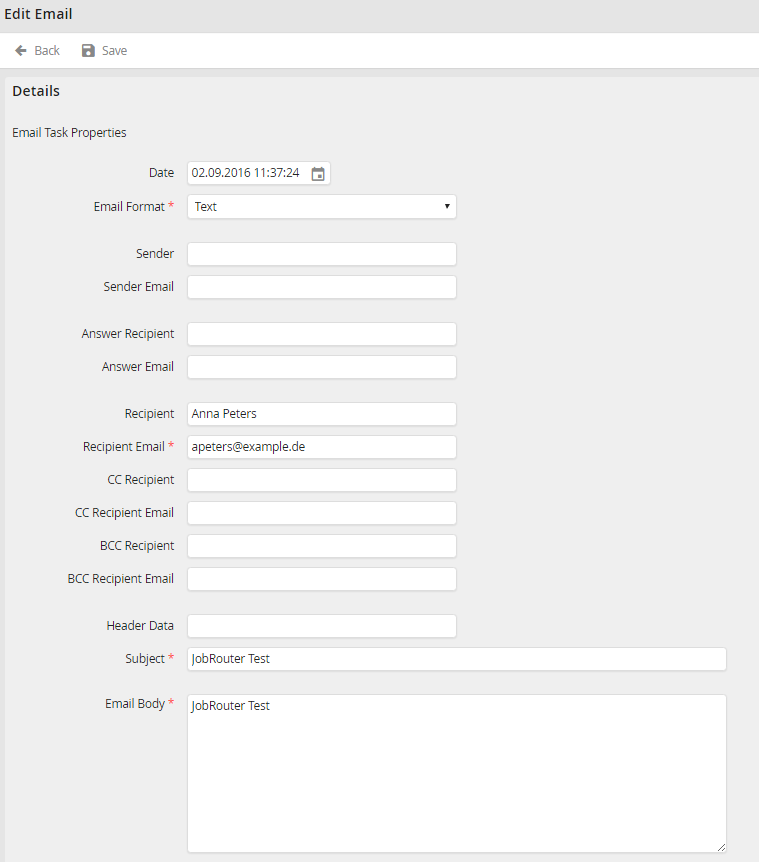
Edit e-mail
You may configure the following settings.
e-mail Settings |
Definition |
|---|---|
Date |
Choose a date. |
e-mail format |
Select a format for the sent e-mail. |
Sender |
Enter the sender name. |
Sender e-mail |
Enter the e-mail address of the sender. |
Answer Recipient |
Enter the recipient who is to receive the answer e-mail. |
Answer e-mail |
Enter the e-mail address of the answer recipient. |
Recipient |
Enter the name of the recipient. |
Recipient e-mail |
Provide the e-mail address of the recipient. |
CC Recipient |
Optionally add names of persons to receive copies. |
CC Recipient e-mail |
Enter the corresponding e-mail addresses. |
BCC Recipient |
If you want to send a hidden copy of the e-mail, enter an additional recipient name. |
BCC Recipient e-mail |
Enter the corresponding e-mail addresses. |
Header Data |
User-defined header data that can be added to the e-mail. |
Subject |
Enter a subject line for the e-mail message. |
e-mail body |
Type the body text of the e-mail message. |
Attachment |
Provide the path name an optional attachment. |
Task Id |
Reference ID that was added when the e-mail task was created (usually workflow ID). |
Send begin |
Date/Time of the first attempt to send (not editable) |
Error |
The error message, if an error occurred during delivery. |
Click Save to save your settings. You will be taken back to the e-mail log overview.
