In this tab you can find the settings for the input and output of data by the user. Please only make changes to the default settings if it is absolutely necessary for the running the system.
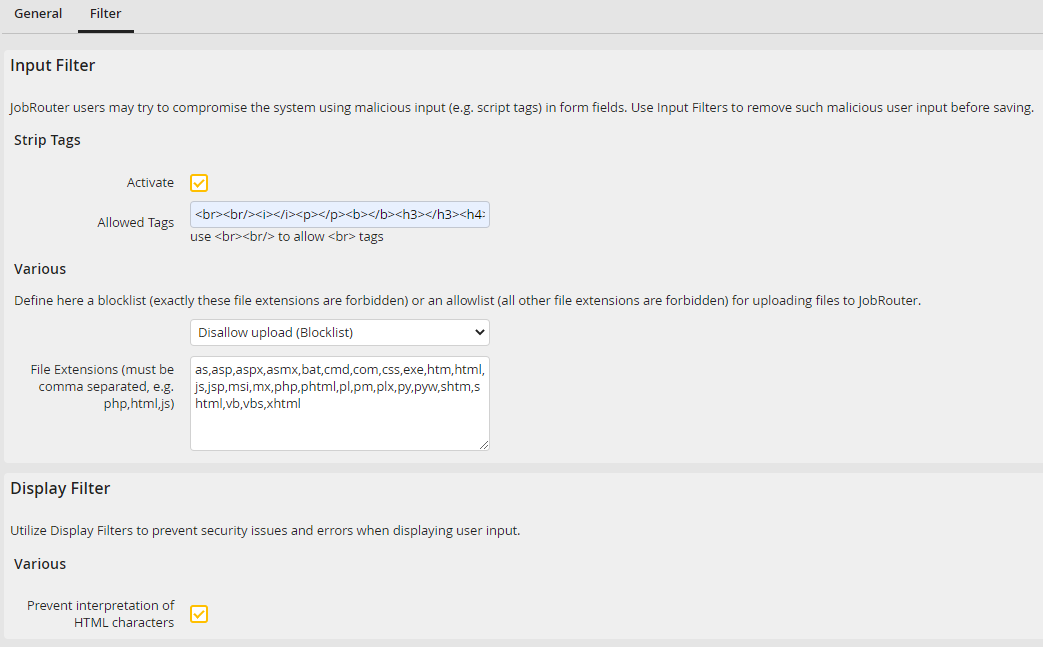
Security settings - Filter
Adjust the following settings.
Security settings |
Definition |
|---|---|
Input Filter - Strip Tags |
|
Activate |
Tick this checkbox in order to prevent the entering of html tags in forms. This setting should always be activated. |
Allowed tags |
List all tags here which can be entered e.g.<br><b>. As a default there should not be any tags listed here. |
File extensions |
List file extensions for a global blocklist or allowlist here. The input is comma separated. The setting applies system-wide, but can be further restricted for FILE elements, for example. zip files created by JobRouter (e.g. for process export/import) are not affected by this setting.
It is recommended to prohibit script files in case of a blocklist. Example: htm,html,js,php,exe,com,bat
Define a global blocklist with file extensions that are not allowed be uploaded to the server or an allowlist with file extensions that are allowed.
Blocklist example: •A global blocklist with file extensions htm,html,js,php,exe,com,bat is configured. •In the process, a FILE element is configured with pdf,html as allowed file extensions.
Expected behavior: Only pdf files can be uploaded in the FILE element, since html files are prohibited by the global blocklist.
Allowlist example: •A global allowlist with the file extensions pdf,docx,txt is configured. •A FILE element with pdf as the allowed file extension is configured.
Expected behavior: Only pdf files can be uploaded in the FILE element, but for example in archive views docx and txt files can also be uploaded. If a file extension such as xlsx is specified in the FILE element, which is globally not allowed, then such a file cannot be uploaded. |
Display Filter - Various |
|
Preventing the interpretation of HTML characters: |
Tick the checkbox so html syntax and scripts, which are saved in the process table fields, are not displayed and executed in the front end (e.g. in the inbox). This checkbox should always be ticked. |
