The Lightweight Directory Access Protocol (LDAP) allows you to query and edit information made available to a network by a directory service. That information is stored in a hierarchical database. Reading that information causes a query to be executed via LDAP. Microsoft's directory service is called Active Directory (AD).
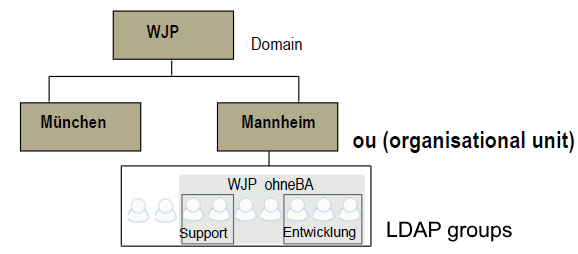
Example: Directory server
A directory service might depict a company's organizational structure arranged as nodes in a hierarchy. This is frequently called an LDAP directory. The topmost node represents a domain, in this case the organization in its entirety. Below that would be grouped several organizational properties, the so-called organizational units (OU), which likewise contain various LDAP groups. Every user can be a member of different groups. In the example above, users are member of the WJP group and of the development group. The groups can include users from different OU.
The user data are maintained in the directory service. Users and Job Functions may be synchronized, that is, automatically refreshed in JobRouter on a regular basis, saving you the trouble of maintaining the same data in your system.
