If you want to edit an already existing instance, click on the respective label. You will see the Edit Instance mask.
Please note: If you performed changes to the module settings or service group ID, the services that are assigned to this instance via the service group ID have to be restarted.
General
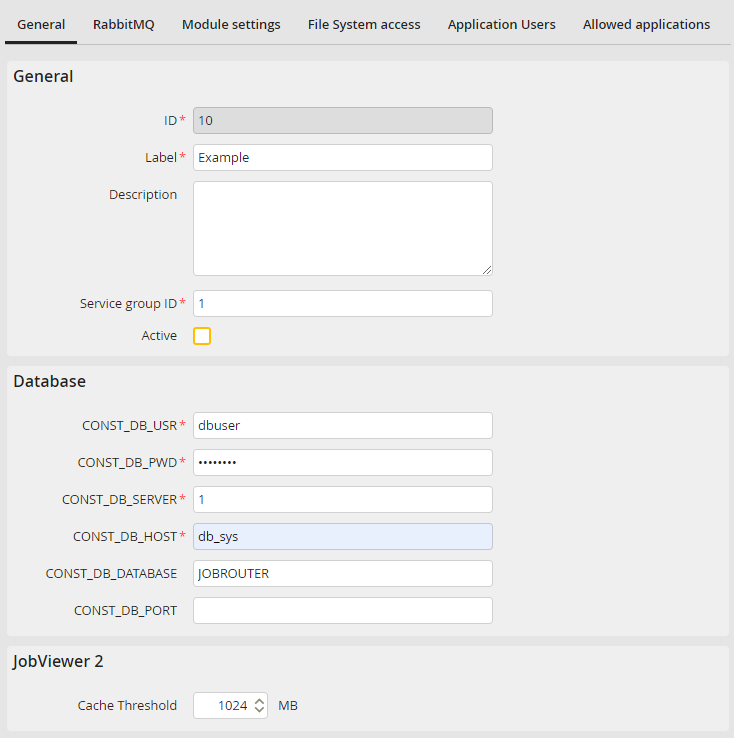
Edit instance tab: General
You may configure the following settings in the General tab:
General |
Definition |
|---|---|
ID |
ID of the instance (write-protected) |
Label |
Label of the instance |
Description |
Description of the instance |
Service group ID |
ID of the service group; Possible values: 1 - 999; Default value: 1 |
Active |
Select the box to allow the JobRouter services to process the instance. |
Database |
|
CONST_DB_USR |
Name of the database user |
CONST_DB_PWD |
Database password |
CONST_DB_SERVER |
Type of the used database client: •1: MySQL / MariaDb •2: Oracle •4: IBM DB2 •5: SQLSRV |
CONST_DB_HOST |
Hostname of the database server or connection string |
CONST_DB_DATABASE |
Name of the database |
CONST_DB_PORT |
Port used for accessing the database |
JobViewer 2 |
|
Cache threshold |
The threshold value in MB above which the cache directory is cleaned up. The oldest cache entries are removed until this threshold value is reached. The default value is 1024 MB. |
RabbitMQ
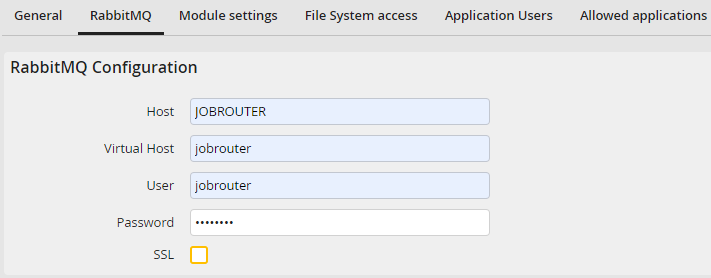
Edit instance tab RabbitMQ
In the RabbitMQ tab you can create connection settings for RabbitMQ. Via RabbitMQ the JobRouter web application communicates with the JobRunner service.
Please note: This tab is not available in the main instance. Please the menu RabbitMQ Configuration for the configuration.
You may configure the following settings.
Settings |
Definition |
|---|---|
Host |
Host for RabbitMQ |
Virtual Host |
Virtual Host for RabbitMQ |
User |
User for RabbitMQ |
Password |
Password for RabbitMQ |
SSL |
In case of communication between RabbitMQ and JobRouter with SSL (HTTPS protokol) this option must be activated to test the connection. The setting does not influence the general communication. For further information, please see the Tech Doc manual. |
Please note: For the secure communication between PHP and RabbitMQ the switch to SSL is mandatory. For further information please see the Tech Doc manual.
Via the button Test RabbitMQ Configuration in the action bar it is possible to test the inserted link settings.
Module settings
The module settings tab Module settings can be used to changinging the log level of the service modules for the instance during operation. The new log level is taken over within a minute without restarting the services. If the Default log level is selected, the setting from the JobRouter Service Configuration still applies.
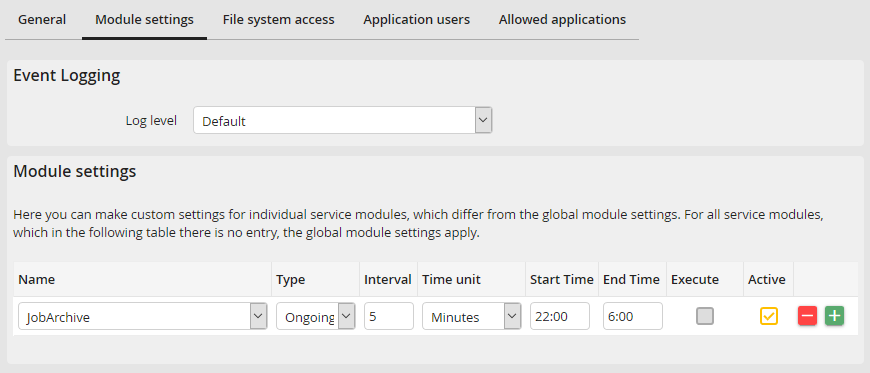
Edit instance tab: module settings
You can also deactivate individual modules for instances or change their runtime settings if they deviate from the standard settings.
You may configure the following settings.
Name |
Definition |
|---|---|
Name |
The module which settings you want to change |
Type |
Processing type •Ongoing: Continuous processing in the following interval •Daily: Processing once a day |
Interval |
Specify the interval (Integer) |
Time unit |
Time unit of the interval |
Start time |
The time when the processing is to start |
End time |
The time when the processing is to end |
Execute |
Execute the module once now (This feature will be available in a later version) |
Active |
Activate/deactivate module |
Please note: Modules not listed explicitly in this menu are automatically active and use the default settings for their execution.
Click Save to store your changes. You will be automatically returned to the instance overview.
File system access
The File system access tab can be used to limit the file system access for this instance. The access is not limited by default. If the JobRouter services are only allowed to access certain directories for security reasons activate the Restrict access to directories option. Here, a table appears where any number of directories can be entered to which access is allowed. Therefore all subdirectories are released.
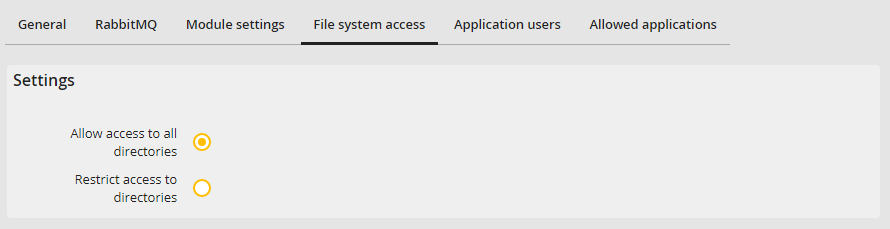
Edit instance tab: file system
Application users
The tab Application users is used to define the users under which PHP via CLI and external applications in the JobRouter service modules are executed.
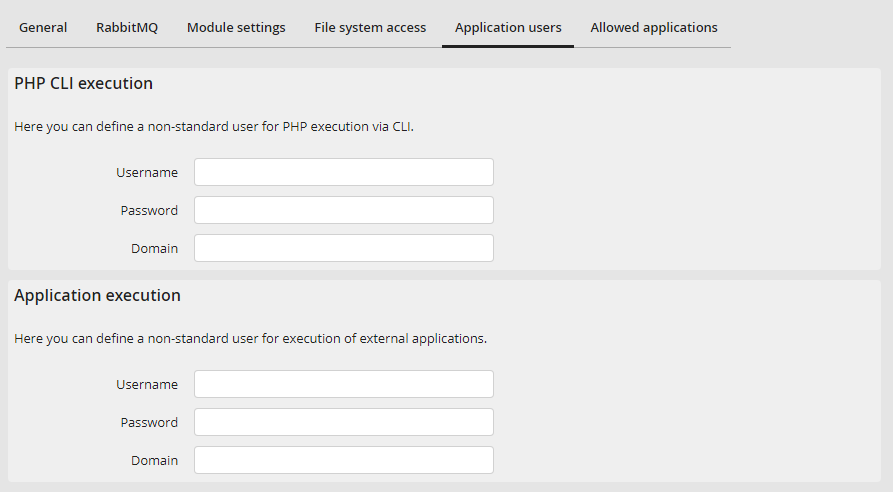
Edit instance tab: Application users
Allowed applications
The tab Allowed applications is used to enter the external applications that are allowed to run in the JobRouter service modules.
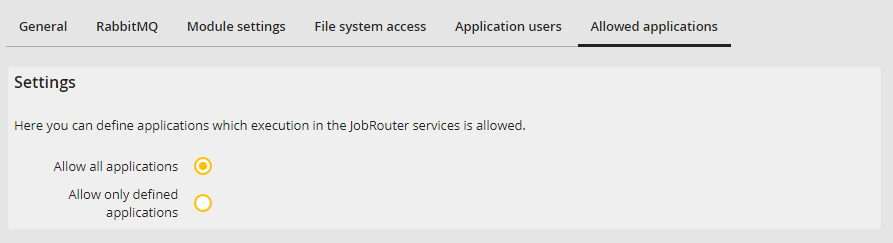
Edit instance tab: Allowed applications
Please note: If the Allow only listed applications option is activated and no applications are entered, no external applications can be executed in the JobRouter service modules. This also includes the execution of PHP via CLI.
