Please note: The menu RabbitMQ Configuration is only available if you are in the main instance and you have licensed the module JobViewer.
In the RabbitMQ Configuration menu you can create connection settings for RabbitMQ. Via RabbitMQ the JobRouter web application communicates with the JobRunner service.
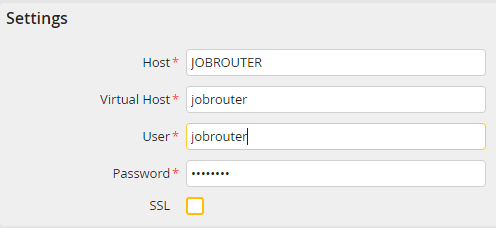
RabbitMQ Configuration
You may configure the following settings.
Settings |
Definition |
|---|---|
Host |
Host for RabbitMQ |
Virtual Host |
Virtual Host for RabbitMQ |
User |
User for RabbitMQ |
Password |
Password for RabbitMQ |
SSL |
The connection test is performed via the HTTP-based API of the RabbitMQ Management Plugin. If JobRouter should call this API via the HTTPS protocol, this option must be enabled. The setting does not influence the general communication. For further information, please see the Tech Doc manual. |
Please note: The respective settings are made during the JobRouterMQ installation. For further information please see the installation manual.
Please note: For the secure communication between PHP and RabbitMQ the conversion to SSL is mandatory. For further information please see the Tech Doc manual.
Click Test in the action bar to test the RabbitMQ connection.
Click Save to save your changes. You will be taken back to the Configuration overview.
