Please note: The menu JobRunner Configuration is only available if you are in the main instance and you have licensed the module JobViewer
In the JobRunner configuration menu, you can make settings for the JobRunner AdHoc modules:
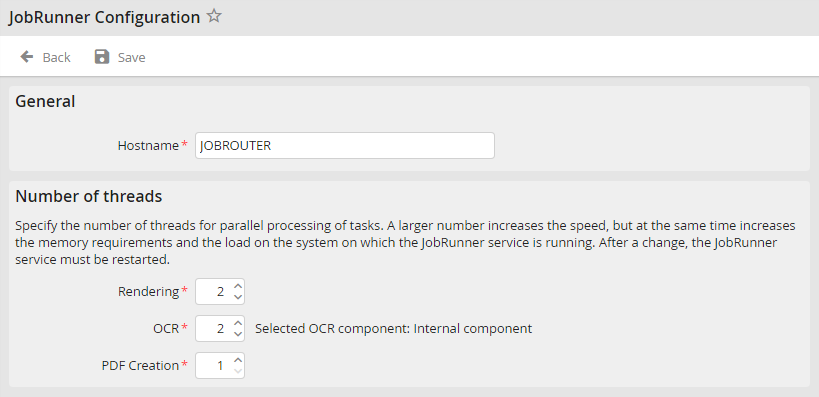
JobRunner Configuration
You may configure the following settings.
Settings |
Definition |
|---|---|
General |
|
Hostname |
Name of the host on which the JobRunner service is installed. If the service is not executed on the same server as the installation of the JobRouter web application, you have to adjust the value accordingly.
Please note: The hostname must not be longer than 15 characters. If the hostname is longer, it should be shortened to 15 characters. |
Number of threads |
|
Rendering |
Number of threads for Rendering in JobRunner. |
OCR |
Number of threads for OCR in JobRunner. If you run Abbyy OCR SDK with a Core license, an OCR setting larger than 1 is ineffective. |
PDF Creation |
Number of threads for PDF setting in JobRunner. |
Please note: After making changes, the JobRunner service has to be started newly.
Click Save to save your changes. You will be taken back to the Configuration overview.
