The Substitutes Tool lets you activate or deactivate substitutes for individual users. The substitutes thus activated will be those designated by the user.
Please note: This feature requires the JobSub add-on module.
Activating and deactivating substitutes
In the JobRouter navigation menu, click Admin Tools | Manage Substitution. A window appears showing a list of users for whom you may activate substitutes.
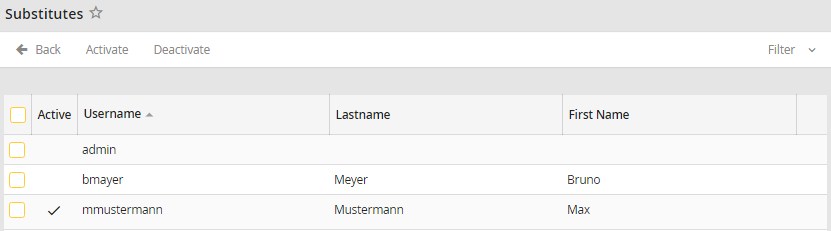
Establishing Substitutes for Users
In the list the username, the last name and the first name of a user are stored. If the Active checkbox is ticked, the substitution function is active for the user. If it is not checked, the substitution function is deactivated.
To activate or deactivate the substitution function for one or more users, check the checkbox in front of the rows. Click on Delete in the action bar. Clicking Activate in the action bar will enable the substitution function for one or more users, clicking Deactivate will disable it. The current state of the substitution function can be instantly seen in the Active column.
If no substitutes are selected for a user, the substitution cannot be activated. A respective message will be displayed.
