The time table of the scheduled task can be edited in the Scheduling tab in the Edit Scheduled task mask. There are three different options available for the repetition interval: Once, Daily, and Weekly.
Please note: The repetition interval is mandatory when creating a task.
Please note: The specified times refer to the time zone of the server.
If you select Once, the task will be executed exactly once at the specified date. This can be used for example for a one time nightly maintenance task or a task on the weekend that does not require manual activation.
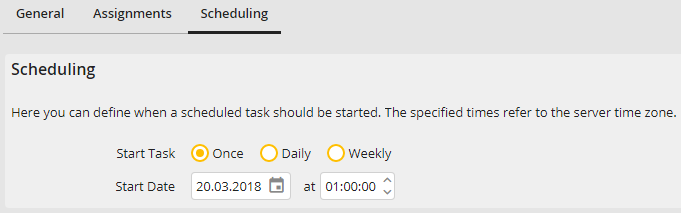
Scheduled task - Scheduling (Once)
You may configure the following settings.
Setting |
Definition |
|---|---|
Start Date |
The start date and time of the task. |
If you select the Daily option, the task will be started on the days provided. The task can be repeated as many times as needed on those days.
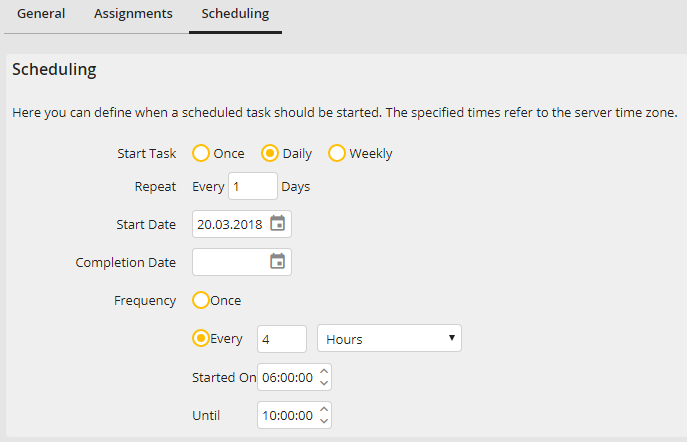
Scheduled Task - Scheduling (Daily)
You may configure the following settings.
Setting |
Definition |
|---|---|
Repeat |
Set how often the task is repeated: E.g.: every day (1), all 2 days, once a week (7 days) etc. |
Start Date |
The day when the task is started for the first time |
Completion Date |
The day when the task is started for the last time |
Frequency (Once) |
The task will be started at the set day exactly once at the set time. |
Frequency (Every) |
The task will be started repeatedly at the set day. You can set the repetition interval in minutes or hours. Furthermore, you can define a time window in which the task is stated. |
You can also start scheduled tasks weekly. The task will be started at the set days in the week and repeated for every set week.
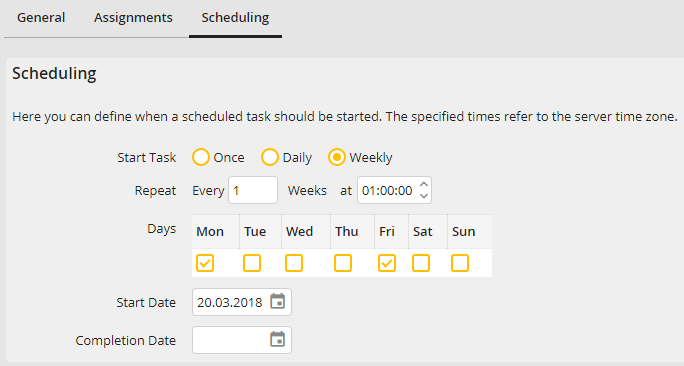
Scheduled Task - Scheduling (Weekly)
You may configure the following settings.
Setting |
Definition |
|---|---|
Repeat |
Set how often the task is repeated: E.g.: every week (1), all 2 weeks (2), all 4 weeks (4) etc. Furthermore, you can select on which days of the week the task is started. You have to select at least one weekday. |
Start Date |
The date when the task is started for the first time. If a specific time is set, the task will be started at exactly this time on the selected days. |
Completion Date |
The date when the task is started for the last time. |
