It is possible to improve the identification of head fields when untypical keys are used for documents. Therefore, define your own key in JobMind Head.
Keys are used to provide a reference to the extracted head field. Keys can be displayed on the left side, above or below the searched value.
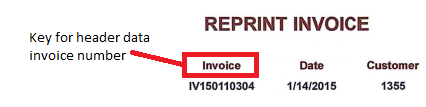
The most common keys are already integrated in JobMind. New keys can be provided via an external file.
For this, the text file keys.txt in the folder of the respective extension is filled with keys. This folder can be created if it should not exist already.

Structure of keys.txt
The structure of the text file is as follows:
;;; This is a comment row
DEFFIELD-INVOICE-NO
Motor vehicle tax number,account assignment number,insurance policy number
DEFFIELD-INVOICE-DATE
Billing date
Please note the following:
•Comment rows start with three semicolons,
•the name of the head field and the keys are listed alternating row-by-row,
•the keys are separated by commas and each has to be a complete word,
•there is no space between the single words,
•the punctuation at the end of a word can be omitted, as they are ignored anyhow (e.g. task number: can be written directly without the colon),
•upper case and lower case letters are ignored,
•for better readability it is possible to insert empty rows between the individual blocks.
If new keys shall be recorded for client-specific JobMind extensions, this is done in the same way. The names of the head fields in the individual extensions are already included as comments in the keys.txt file of the respective extension.
Head fields of the Invoice extension
In the Invoice extension provided by JobMind Head by default, the following head fields are available. It is possible to record additional keys. These don't have to be recorded in the text file supplementary.
DEFFIELD-INVOICE-NO
Stands for the invoice number. The following keys are integrated by default:
Gebührenbescheid-Nr, Gebührenrechnung, Rechnung-No, Abschlagsrechnung, Abschlagsrechnung-Nr, Abschlagsrechnungs-Nr, Beleg-Nr, BelegNr, RE-Nr, RE.Nr, RG-Nr, RG.Nr, RG-Nummer, RE-Nummer, Rech-Nr, Rechn-Nr, Belegnummer, Rechnung, Rechnungsnr, Rechnungnr, Rechnungsnummer, Rechnungs-Nr, Rechnung-Nr, Rechn.Nr, Rech.Nr, Schlussrechnung, Schlußrechnung, Rechnungs-Nummer
DEFFIELD-INVOICE-DATE
Stands for the invoice date. The following keys are integrated by default:
Datum, Rechnungsdatum, Rechnungs-Datum, RG-Datum, RE-Datum, Beleg-Datum, Belegdatum
DEFFIELD-CREDIT-NOTE-NO
Stands for credit note number. The following keys are integrated by default:
Nr, Nummer, Gutschrift, Gutschriftsnummer, Gutschrift-Nummer, Gutschrifts-Nr, Gutschrift-Nr, Gutschriftnummer, Beleg-Nr, Belegnummer, Provisionsgutschrift-Nr, Provisionsgutschrift
DEFFIELD-IBAN
Stands for the IBAN. The following keys are integrated by default:
IBAN, IBAN-No.
DEFFIELD-TAX-NO
Stands for the tax number. The following keys are integrated by default:
Steuer-Nr, Steuernummer, Steuernr, Steuer-nummer
DEFFIELD-VAT-ID
Stands for the VAT number. The following keys are integrated by default:
USt-Id-Nr, Ident-Nr, UID, UID-Nr, USt-IdNR, USt-ldNr
