The Desktop view is used for the display of forms on desktop clients.
Open the form editor as described in chapter Create and edit a form. Either click the corresponding  symbol in the Form overview or select the desired form in the form picklist of the Designer navigation menu.
Forms are made of nested tables, allowing you to model your forms with the greatest possible flexibility and independent of rows. They can consist of an arbitrary number of pages, sections, lines, columns, and Elements, all of which are detailed below.
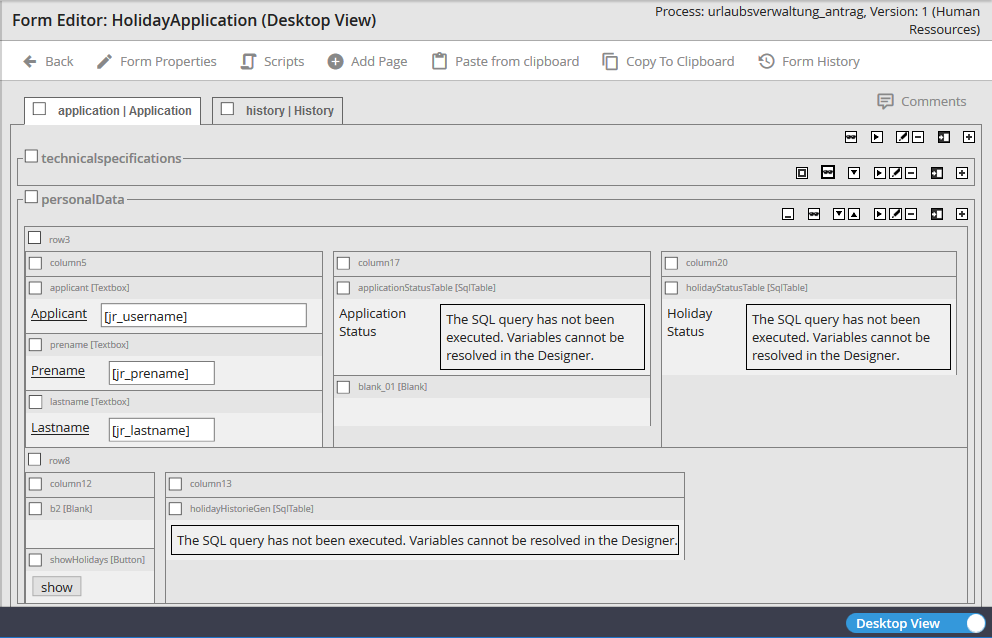
Form structure
A page consists of sections, rows, columns, and elements. You can set up a page without any sections, rows, columns, or elements, but you cannot add a section in your form until you have added a page. The same goes for rows, columns, and elements. You can incorporate rows into the form only after you have established a section. Likewise, rows do not necessarily have to contain a column. However, if you wish to arrange elements in your form, you need columns, as elements can only be linked to columns.
