Input parameters can be defined in this tab.
Feature |
Definition |
|---|---|
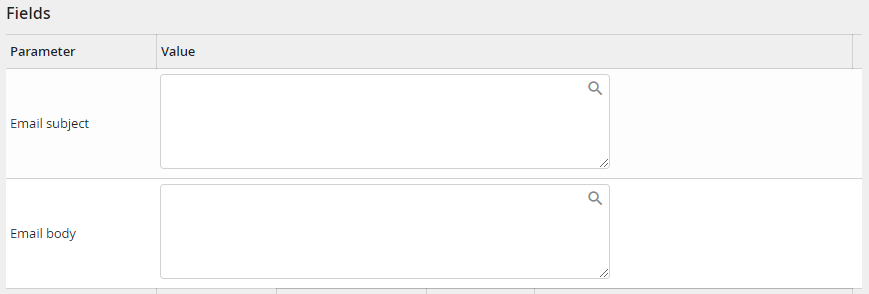
E-mail subject |
E-mail subject, which is send to the external recipient by eSignAnyWhere. If no subject is indicated a default subject is used. |
E mail text |
E-mail text, which is send to the external recipient by eSignAnyWhere. If no text is indicated a default text is used. |
Feature |
Definition |
|---|---|
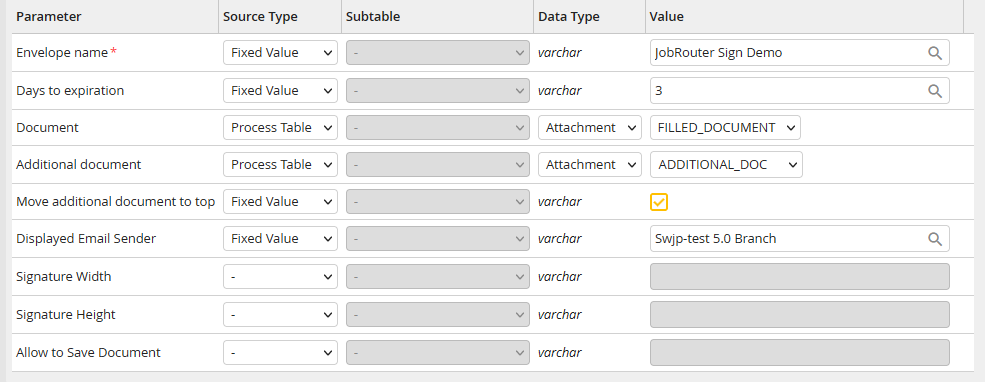
Envelope subject |
Envelope subject, which is displayed in the information e-mail of eSignAnyWhere. |
Validity (days) |
Signature operation order validity in days. After expiration the document may not be signed any more, as long as it is not reactivated by an administrator or via the process. The maximum is 28 days, a document cannot be valid for an unlimited period of time. If no value is set, the validity will be defined automatically with 28 days. |
Document |
The document to be signed, which must be in *.docx format and contains signature fields already defined in the template. So it is e.g. possible to use the same template for the JobPDF module and to insert process-specific data before it is send for signage.
If no document is attached, the selected blank template is used for signing. |
Additional Document |
Additional documents, which are going to be attached to the Word template and send also for signing. The document must be in PDF format. So it is e.g. possible to equip a PDF document, which is created by a Third party application, with a signature page (the *.docx document), and to sign it as a single document. |
Move additional document to top |
When using an additional PDF document, it can be chosen if it should be clamped ahead or behind the template document during the assembling. |
Displayed Email Sender |
The display name of the sender of the eSignAnyWhere notification email. |
Signature width |
Width of the signature field in pixels. Minimum and default (if not defined differently) is 150 px |
Signature height |
Height of the signature field in pixels. Minimum and default (if not defined differently) is 75 px |
Allow to Save Document |
If this option is enabled, the user can download the document directly from eSignAnyWhere during the signing process. He can choose between the original document and the finished, signed PDF document. |
For each recognized signature field in the Word template, a signature configuration section is displayed. Thereby, the signature ID (e.g. JobSign_signer1) is extracted from the placeholder of the signature field and displayed in the configuration section title.
Please note: If a Word template contains the same placeholder several times (e.g. JobSign_signer1), the system activity automatically recognises a batch signature. In this case, the parameter Batch Signature is displayed.
Input paramter
Feature |
Definition |
|---|---|
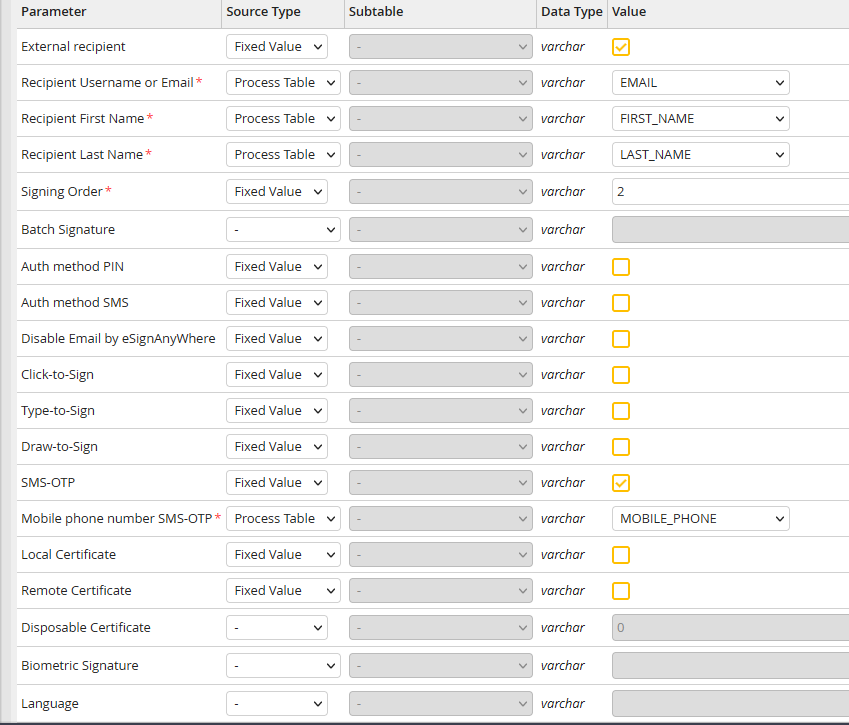
External recipient |
Flag, stating if the signature must be made by a JobRouter user (0, not ticked) or an external recipient (1, ticked). If the recipient is a Jobrouter user, the signed document can be displayed in the related Dialog integration. Therefore, the link in the output parameters must be linked with a process table field. |
Recipient (user name) |
In case of an internal recipient the user name must be stated. |
Recipient (e-mail) |
In case of an external recipient the e-mail address must be stated |
Recipient (first name) |
First name of the external recipient |
Recipient (last name) |
Last name of the external recipient |
Order in which the signatures must be given. The number must be defined from 1 to x. Number 1 signs first, than number 2 as second etc. It is also possible to make multiple signatures simultaneously by assigning the same number to these fields. |
|
Batch Signature |
Parameters for the batch signature. With the batch signature, the recipient can decide whether he wants to sign all signatures within a document at once or each signature separately. Possible values are SIMPLE, UNSELECTED and PRESELECTED. |
Authentication via PIN |
Activate this option if a PIN code should be requested when the document is opened. |
PIN Code |
Fixed PIN code, which is requested, when the document is opened. Attention: The recipient must know this code. |
Authentication via SMS |
Activate this option if a (randomly created) PIN code should be requested when the document is opened. It is send via SMS to the stored mobile number. |
Mobile number |
Mobile number, to which the (randomly created) PIN code is send when the document is opened. Please note: the mobile number must be entered in the international format, e.g. +49123456789. |
Disable e-mail from eSignAnyWhere |
In case of an external recipient the notification mail with the invitation to sign is send from eSignAnyWhere. With this option this e-mail can be disabled and an own e-mail can be send through the JobRouter process. Therefore, the link in the output parameters has to be linked with a process table field. |
Click-to-Sign |
Signature activation method "Click-to-Sign" enables the signing of the document simply by clicking the signature field. |
Type-to-Sign |
Signature activation method "Type-to-Sign" enables the signing of the document by typing the own name. |
Draw-to-Sign |
Signature activation method "Draw-to-Sign" enables the signing of the document by writing the name with the mouse, finger or stylus. |
SMS-OTP |
Signature activation method "SMS-OTP" enables the signing of the document simply by clicking the signature field. When clicking, a one-time password (OTP = One-time-password) will be send to the stored mobile number. The user has to enter the password before signing the document. |
Mobile number |
Mobile number, to which the password will be send when SMS-OTP is used. Please note: the mobile number must be entered in the international format, e.g. +49123456789. |
Locale certificate |
Signature activation via local certificate. To use this signing method, the SIGNificant Device Driver must be installed on the Client of the user. Please note: This option is only available with JobLink for Namirial license. |
Remote certificate |
Activates the signature via Remote certificate. Please note: This option is only available with JobLink for Namirial license. |
Disposable certificate |
Activates the signature via Disposable certificate. Please note: This option is only available with JobLink for Namirial license. |
Biometric Signature |
Enables biometric signatures with appropriate input devices. |
Language |
Language, in which the eSignAnyWhere integration and the notification e-mail is displayed. The language must have ISO format (en, de, fr, ru, usw.). If nothing is defined, the language of the user is used for internal recipients and the JobRouter system language is used for external recipients. |
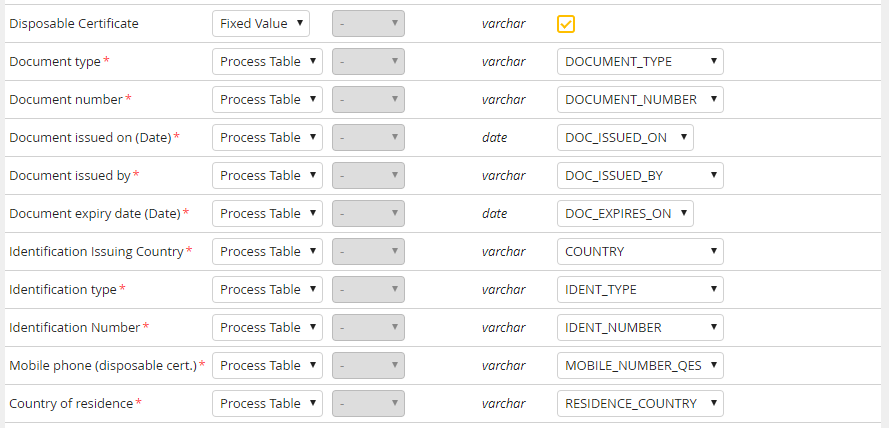
Disposable certificates are certificates for a qualified electronic signature that are only valid for a single business case. Separate input fields are required for these certificates, which only appear when you activate the "Disposable Certificate" option.
Feature |
Definition |
|---|---|
Document type |
The document type used to identify the signer for the current case.
Allowed values (please use the given acronym): CI - Identity Card PA - Drivers License PASS - Passport
Please note: Depending in the law in your country, the driving license may only be used to legitimise the transaction if the passport or identity card were presented for initial identification. |
Document number |
The number of the document specified under document type (for example, the ID card number) |
Document issued on |
The date of issue of the document |
Document issued by |
The issuing authority of the document |
Document expiry date |
The expiry date of the document |
Identification Issuing Country |
The country where the document was issued. The country code (format: ISO 3166-1 alpha-2) must be given. |
Identification type |
Document type with which the certificate holder / signer is or was identified for the first time.
Allowed values (please use the given acronym): PASSPORT - Passport PERSONAL_NUMBER - National unique number ITALIAN_TAX_CODE - Tax code FOREIGN_TAX_CODE- Tax code NATIONAL_IDENTITY_CARD - Identity Card
Please note: In certain countries, depending on the law, only the passport and identity card may be used for initial identification. |
Identification number |
The number of the document specified under identification type (for example, the ID card number) |
Mobile phone |
The mobile phone number of the signer. The PIN code is sent to this number when the signer wishes to sign the document.
Please note: the mobile phone is linked to the name of the signer the first time it is used, i.e. it cannot be reused for any other signers afterwards. Please note: the mobile number must be entered in the international format, e.g. +49123456789. |
Country of residence |
Country of residence of the signer The country code (format: ISO 3166-1 alpha-2) must be given. |
Please note: Disposable certificates can only be used if a so-called LRA - Local Registration Authority - has been defined for the organisation stored in eSignAnyWhere. Please contact Namirial for this and for clarification of the organisational constraints.
