To define a new table that can be managed by JobData click in the overview of all existing data on the New button in the action bar. You will see the dialog box shown below.
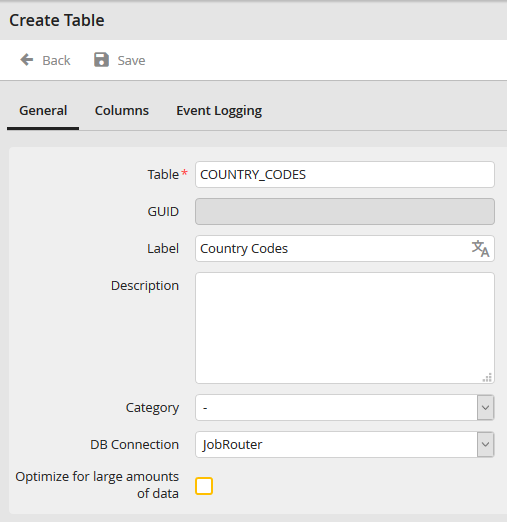
Create table: Tab General
Here you can make the following settings:
Properties |
Definition |
|---|---|
Table |
Insert the actual name of the database table. If a table with the same name exists already an according error message will be displayed when saving the table. |
GUID |
GUID of the managed table. They will be generated automatically when creating the table. |
Label |
Insert a label for the table here. You can translate the label into multiple languages (only with the licensed module JobMultilingual). The label will be displayed for the user. |
Documentation |
You may describe the table. |
Category |
Chose one category. The category determines, where the authorized users can find the menu item for editing the data. You can chose from already existing process categories. |
DB connection |
Here a database connection can be selected. You can chose between Internet connections (JobData, JobRouter) and all globally configured database connections. |
Optimize for large amounts of data |
Here you can activate the server-side processing of the table. This will result data to be requested from the database server for each action - scrolling, sorting, filtering - to display the current page. This reduces the load on the end user's client, as well as the amount of data transferred, but increases the frequency of database queries when used actively. Additionally, the search is not performed automatically while making an input, but by a click on the Search button or pressing the ENTER-key.
Please note: With this type of processing, the search differs from the client-side full-text search because it searches for database values and not for display values. This restricts the search for date values. You can only search by year (e.g. 2019) or by complete date values (e.g. 18.09.2019). For other values such as 18.09 or 09.2019, the date database columns are not searched.
|
Please note: When creating a table a profile with the name FullAccess will be created automatically containing all authorizations.
