What are archive profiles?
Archive profiles manage the user authorization of archives. In every archive profile, the rights for document operations and restrictions on index and system fields can be set for an archive. Each user can be assigned one archive profile per archive.
It can be set for every archive view, if the archive profiles of the archive are to be considered. Archive views without consideration of archive profiles are displayed to all members of the assigned Job Function. Archive views with consideration of archive profiles will only be visible to members of the assigned Job Function if they are also assigned to an archive profile for the archive. In this case, the rights and limitations assigned to the user via the archive profile take effect in the archive view (in addition to the possibly directly set limitations in the archive view).
Users assigned to an archive profile with activated right to delete documents, have the possibility to delete documents via the archive views and the REST API from the corresponding archive.
Optionally, archive profiles can also be used when accessing documents and result lists via JobArchive form elements, JobArchive form integrations and JobSelect columns of the JobArchive type.
The authenticated user needs the appropriate rights for an activated archive profile to get access to the archive configurations and documents via REST API.
Create and edit archive profiles
Click on New in the action bar of the Manage Archive dialog mask to create a archive profile. If you want to edit an already existing archive profile, click on its name.
In either case, the Edit archive profile dialog window will be displayed.
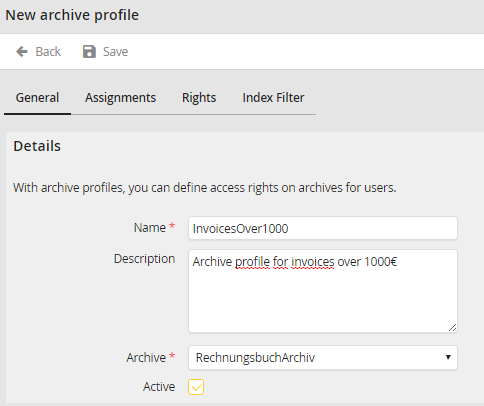
Edit archive profile - General tab
You may configure the following settings:
Details |
Definition |
|---|---|
Name |
Enter a name for the archive profile here |
Description |
Enter a description for the archive profile here |
Archive |
Select an archive the archive profile is used for |
Active |
Enable this checkbox to activate the archive profile. Without activating an archive profile, all users who were assigned to the archive profile will not be able to access the respective archive. |
Click Save in the action bar to save your settings.
