Add a new user import task by clicking New in the action bar, or edit an existing user import task by clicking its name in the overview. In both cases, the following Add/Edit User Import dialog window will be displayed.
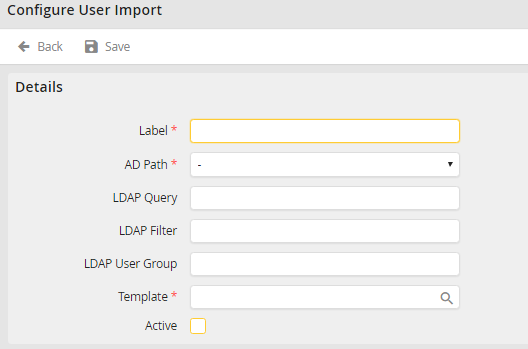
Add/Edit a user import task
You may configure the following settings.
User Import |
Definition |
|---|---|
Label |
Assign a name to the LDAP query. |
LDAP Path |
Choose a node under which the groups are to be synchronized. |
LDAP Query |
Type in the corresponding organizational unit and domain under which the LDAP group can be found. |
LDAP Filter |
Use the filter to restrict the LDAP elements imported. For example, restrict it to users having an e-mail address ending in "@example.org". In this case the filter would be the following: (&(mail=*@example.org)). You may enter other filter criteria one after the other, e.g.: "(&(mail=*@example.org)(givenName=Mueller))". |
LDAP Group |
Enter the names of the group to be synchronized |
Template |
•Required field •Use the symbol •All users in the LDAP group will be added to JobRouter with the settings and user rights taken from this template profile. You will not be required to configure the settings individually for each user. The synchronization process will do it for you. |
Active |
Select the checkbox to activate the synchronization. |
 to select a user profile.
Click Save to save your entries and be taken back to the user import overview. The members of the LDAP group will be added to the JobRouter system. As long as the synchronization is active, the user records will be refreshed at regular intervals.
Please note: Users that were created manually in the JobRouter before the first LDAP/AD synchronisation are neither matched nor updated during the LDAP synchronisation. These users must first be deleted in the JobRouter so that they can subsequently be created and updated by the user import. Manual users such as the admin user should not be deleted under any circumstances.
