Create and edit filters for archive views
Every archive view has a filter section. There you can search for specific values of the various index fields and system fields. In this tab, you can define which fields will be shown in the filter section.
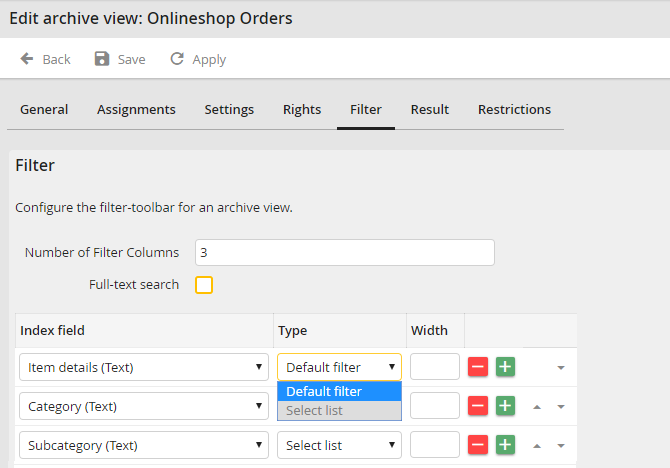
Edit Archive View - Filter tab
Define the number of columns of the filter in the Number of Filter Columns field. After this number of filter columns the next filters will be displayed after a line break in a new row.
When the Full-text search checkbox is activated, an additional input field Full-text will be displayed in the filter of the archive view that can be used for a full-text search of the documents.
Add new entries to the list of index fields with the button  or remove entries using the button
  . The arrows move the position of a field. The order of the filters corresponds to the display of columns in the filter section of the archive view.
You can edit the following values of every column:
Column |
Definition |
|---|---|
Index field |
Select the index field or system field of the archive you want to display as field in the filter section. Note: The Locked Status system field allows the archive view to be filtered for documents that have been locked (or unlocked) by the user or by another person. |
Type |
Select a filter type to decide how the field will be displayed in the filter section.The options Default filter and Select list are available |
Width |
Enter the width of the column in pixel. |
Possible filtering types
Please note: If a display column from the archive view refers to a select list, it does not display the text but the stored value of the select list.
Default filter
The default filter allows users to search any value using different methods (corresponds to, equals, between,...).
Select list
If a select list has been defined for the index field in the archive, you can integrate it as dropdown menu in the filter field.
SELECT category FROM CATEGORIES
Please note: List-dependent select lists are only functional if you refer to an index field with type select list.
For an index field of type select list, you can also refer to the set value of an existing filter. This allows you to create list-dependent select lists in the archive.
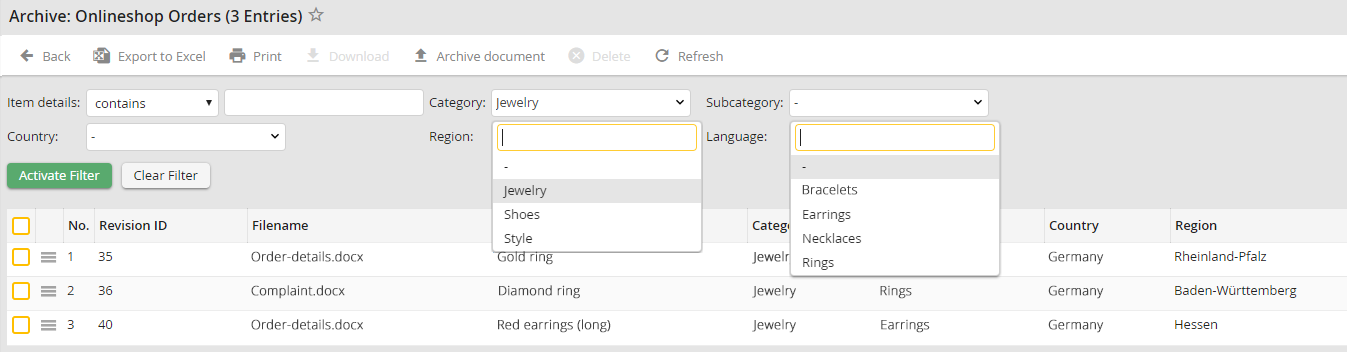
List-dependent select lists - Example: The filter Category is used to determine the filter Subcategory
The select list defined in the index field can look like this, for example:
SELECT subcategory FROM CATEGORIES WHERE category = '[filter_category]'
