Add a new monitoring task by clicking New in the action bar. If you want to edit an already existing task, click on its name. In either case, the Edit Scheduled Task dialog window will be displayed.
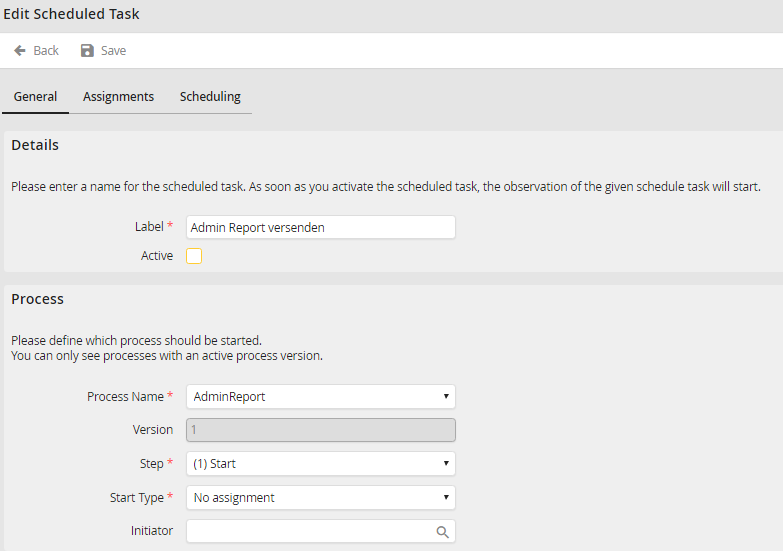
Add/Edit Scheduled Task
You may configure the following settings.
General settings |
Definition |
|---|---|
Details |
|
Label |
Assign a name to the task. |
Active |
If this box is checked, the respective scheduled task will be enabled. |
Process |
|
Process name |
Choose the process to be initiated. •The process must have an active version. |
Version |
The current version will be automatically set. |
Step |
Choose a process step to be initiated. |
Start Type |
Select whom the first step will be assigned to. •No assignment – the step will not be assigned to a user or Job Function, e.g. when you start a system step •User – the step will be assigned to the user defined in the Username field •Job Function – the step will be assigned to the Job Function defined in the Job Function field •For each user in a Job Function – A new instance will be started for every user in a Job Function. The step will be assigned to the user. •User and Job Function – the step will be assigned to the user defined in the Username field and the Job Function defined in the Job Function field. |
Username |
•Depending on the start type, specify a username for which the first process step is to be activated. •Enter the name directly, or choose from a list by clicking the symbol. |
Job Function |
•Depending on the start type, choose a Job Function for which the first process step is to be activated. •Enter the Job Function directly, or choose from a list by clicking the symbol. |
Initiator |
Choose a user to be appointed Initiator for the chosen instance. |

Click Save to save your settings. You will be redirected automatically to the scheduled tasks overview.
