Set a user's password and grant user rights under Security. You thereby determine which system related rights, such as Manage Users or Manage Processes, a user gets access to.
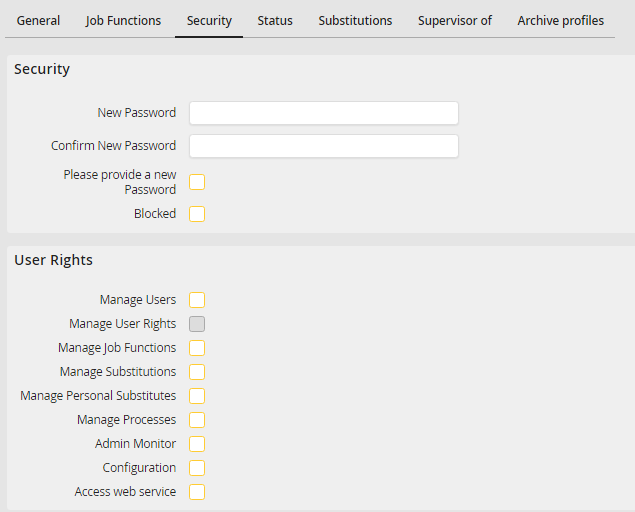
Specify a User's Password and User Rights
Please note: If the currently signed-in user does not have the right to manage user rights or if the rights management is done via user profiles, the User Rights section will not be displayed in the Security tab. The Substitution tab is only visible, if the currently signed-in user has the Management substitutes right.
You may configure the following settings:
Security settings |
Definition |
|---|---|
Security and information |
|
New Password |
Set the user's password |
Confirm new password |
Re-enter the password |
Password must be changed |
Checking this box forces the user to change his password during his next login. |
Blocked |
Checking this box blocks the user account. Further information on blocked users can be found here. |
User rights |
|
Manage Users |
The user may create, edit, and delete processes. |
Manage User Rights |
In case the user has this right, he is able to assign and revoke system relevant rights of other users. This right is applies to both the menu to edit a user as well as the menu to edit a user profile. |
Manage Job Functions |
The user may create, edit, and delete Job Functions. |
Manage User Profiles |
The user may create, edit and delete user profiles. |
Manage Substitutes |
The user can activate and deactivate substitutes for another user. If the user has the additional right to edit users, he can also set the personal and Job Function specific substitutes for a user in the Substitute tab of the user settings.
Please note: This function is only available under the licensed JobSub module. |
Manage Personal Substitutes |
The user can maintain his personal and Job Function specific substitutes in the menu Manage Substitutes himself.
Please note: This function is only available under the licensed JobSub module. |
Managing Processes |
The user may create, edit, and delete processes. He has access to the JobRouter Designer. |
Manage Tables |
The user may define database tables, which can be managed by using the JobData module.
Please note: This function is only available under the licensed JobData module. |
Admin Monitor |
The user can open the admin monitor menu in order to get informed about the system status and errors that might have occurred. If this right is set, the user can also activate notifications for the admin log in their own settings. |
Configuration |
The user can access the Configuration Tools and can edit all JobRouter settings. |
Access web service |
Allows the user to log into the JobRouter Web service and use it. For further information on the web service see the JobRouter web service manual. |
Click Save to save your settings. You will be redirected automatically to the user overview.
