The main menu is on the left side of the browser window:

Via the menu symbol  the menu can be extended so that a description text is shown:
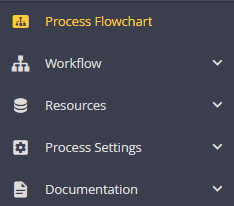
Click on a menu item to open the second level of the main menu:
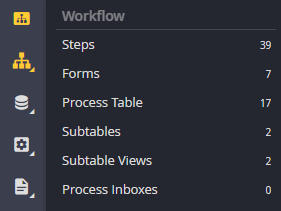
Main menu with second level (hover)
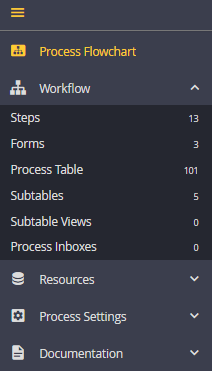
Unfolded main menu with second level
The categories of the Designer are thematically arranged. This gives you a quick overview of the JobRouter Designer. You can directly access the various edit menus. Individual menu items are only displayed when a license is existing.
Workflow
Category |
Description |
|---|---|
Process Flowchart |
Use the Process flowchart to illustrate your process graphically. |
Steps |
Use the Steps overview to access individual steps, such as: |
Forms |
Create and edit Forms. Use forms as an interface to the user. Write your own scripting functions. |
Process Table |
Maintain your Process table fields. The field entries represent your process variables. |
Subtables |
Define any Subtable to store your line item data for your process. |
Subtable Views |
Use the Subtable views to display your subtables and link them to your forms. |
Process Inboxes |
Define special Process inboxes for your process. |
Resources
Section Category |
Description |
|---|---|
Process Messages |
Use Process messages to define central messages that can be used in forms, rules, scripts, PHP functions and E-mail texts. |
Job Functions |
Assign different Job Functions to the process. |
Lists |
You can use pre-defined Lists in your forms and subtable views. |
PHP Functions |
USe PHP functions to write your own program directly in the JobRouter Designer. |
Database Connections |
Define Database connections to get access to external database systems. |
JobMind BAU fields |
Add user-defined fields for the form element JobMind BAU in the JobMind BAU fields configuration. For further information read theJobMind BAU manual. |
Process Settings
Section Category |
Description |
|---|---|
Properties |
Define process details in the Properties section. |
Process Escalations |
Escalation actions can be defined for instances of a process. |
Manage Languages |
If you want to create a Multilingual process you can select the corresponding languages in this section. |
Process Configurations |
Apply central settings in the Process configurations that you can use in your forms, rules, and PHP functions. |
Documentation
Section Category |
Description |
|---|---|
Process Documentation |
The process documentation gives you an overview of your complete Process. |
Change Log |
Any Changes that you make in a process are automatically logged and can be viewed here. |
Process Comments |
Here you can view and browse through your Process comments. |
